Ada Concurrent Programming

About
Ada is a block-structured, object-oriented, concurrent language. The concurrency model is designed to best suit client-server and embedded applications. The notes here are intended to give an overview with examples but are not intended to be complete.
I have brief notes on Ada here. There is also an Ada Programming Wikibook that is pretty good, and there’s a good section in there on tasking.
The Basic Ideas
The Ada concurrency philosophy can be summed up with these three ideas:
- Active objects are represented by tasks and (passive) resources by protected objects. As a secure language, tasks and protected objects are members of task types and protected types, respectively.
- Tasks run concurrently with other units.
- Tasks are activated implicitly by their parent, communicate via variables or the rendezvous mechanism, and terminate before their master can.
That’s it! The rest is just details.
Task Declarations
The task specification defines the type and says which entries are available for clients to call, if any:
task type Mailbox is
   entry Store (L: Letter);
   entry Retrieve (L: out Letter);
end Mailbox;

Now, you can declare objects of that type:
M1, M2: Mailbox;
A: array (1 .. 200) of Mailbox;
type Mailbox_Pointer is access Mailbox;
The task body, or implementation, is always written separately from the specification. Always.
task body Mailbox is
   The_Letter: Letter;
begin
   loop
      accept Store (L: Letter) do
         The_Letter := L;
      end Store;

      accept Retrieve (L: out Letter) do
         L := The_Letter;
      end Retrieve;
   end loop;
end Mailbox;
By the way:
- Tasks cannot be library units, i.e., they must always be declared inside of some other unit.
- Tasks can have private entries, which can only be called by local tasks or used internally for a requeue (to be described later)
- You can define a one-off task with
task T; task body T is .... end T;. In this case, an anonymous task type is created for you, andTis made an instance of that type.
Life of a Task
Here’s how it all works. It looks complicated, but really it’s quite sensible:
- T is nonexistent.
- P gets called.
- P starts by elaborating its declarative part.
- The elaboration of task T; (by P) makes T created.
- P finishes the elaboration of its declarative part (i.e., reaches the
begin). - T starts activating, that is, elaborating the declarative part of its body. It does this while P is blocked.
- T finishes activation then starts executing concurrently with P.
- T finishes executing (i.e., reaches the
end) and is thus completed. - When T’s dependent tasks have terminated, then T starts finalizing.
- After finalization, T is terminated.
- P can complete at any time, but can only finalize and terminate after T terminates.
- When P terminates, it returns, and thus T is out of scope and hence nonexistent.
Activation
Activation is the elaboration of the declarative part of a body. That is, the part before the construct’s begin. (Running the part between begin and end is called execution.)
Basic Principles of Activation
The general idea is that a parent creates a task during its activation, then waits for the dependent tasks to finish their activations before executing.Here’s an example picture that may help. For the block:
M: declare
      ⋮
      task T1;
      task T2;
      task T3;
      ⋮
   begin
      ⋮
   end M;
a possible timeline is:
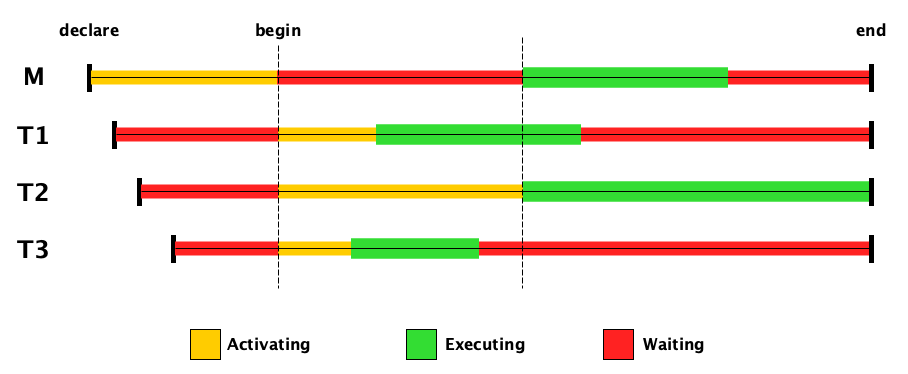
Note that:
- The tasks are created during the elaboration of M.
- The tasks don’t get to start activating until M has finished its activation.
- M has to wait while the tasks do their activation.
- When a task finishes its own activation, it gets to start executing right away.
- M does not get to start executing until all of the tasks have finished activating.
- M must wait for the last task to finish before it can finish.
Again, while it looks complicated, it makes sense!
Activation of Dynamically Allocated Tasks
Now you might ask, what if a task is created dynamically? In this case, the parent is the unit that evaluates the new expression. For example:
- At the assignment, a new controller object is allocated.
- The new controller object activates while P is blocked.
- After activation of the controller, the parent P resumes execution and starts executing concurrently with the controller.
Activation of Tasks in Packages
Because package bodies can have executable code, there’s nothing too special here!
package P is
   task T;
end P;

package body P is
   task body T is
   begin
      -- ...
   end T;
begin
   -- At the begin, T begins activating. P is blocked until
   -- T finishes activating. After T finishes activating,
   -- P resumes execution and runs concurrently with T.
end P;
Communication
Tasks communicate in one of two ways:
- By reading and writing shared variables, defined in “outer” scopes that both tasks can see.
- Via the rendezvous.
Typically, shared variables will hold protected objects to prevent race conditions, but you are free to share unprotected variables if you like. We’ll cover the rendezvous first.
Rendezvous
The rendezvous is the Ada mechanism for two tasks to communicate with each other. One task makes an entry call to another task. The caller blocks until the callee accepts the call, which happens at an accept statement in the callee. If the callee reaches an accept statement and there are no outstanding calls to that entry, the callee blocks waiting for a caller. Technically, the rendezvous is the part inside the callee’s accept statement, which is executed while the caller is blocked. When the accept statement finishes, both tasks proceed concurrently.
The rendezvous is fully synchronous: both sides wait for each other. (Later we’ll see ways to cancel the wait if desired.)
Here’s a classic example. First the caller (client) task:
task type Customer;

task body Customer is
   P: Phone_Number;
begin
   -- ...
   Operator.Inquire("Alice", P);
   -- ...
end Customer;
And the callee (server):
task type Operator is
   entry Inquire(Name: String; Number: out Phone_Number);
end Operator;

task body Operator is
begin
   -- ...
   accept Inquire(Name: String; Number: out Phone_Number) do
      -- ...
      Number := Get_Phone_Number(Name);
   end Inquire;
   -- ...
end Operator;
Servers often sit in loops. More about this later.
But first, time for the deep and important details:
- The caller and callee both wait for each other to arrive at the rendezvous: the caller needs to get to the entry call, and the callee to the accept statement.
- The caller is blocked while the server executes the
acceptstatement, so a best practice says: KEEP THE ACCEPT REGION AS SMALL AS POSSIBLE AND PLEASE DON’T DO ANYTHING INSIDE THE ACCEPT THAT MAY BLOCK THE SERVER. - There is a queue of callers for each entry. The queueing policy is FIFO by default; other policies are possible.
- For any entry
E, the expressionE'countgives you the number of callers queued up with pending calls to that entry. - It is possible to have entry families. An example declaration might be
entry Channel(1..3)(X: Data). An accept statement might look likeaccept Channel(2)(X: Data) do ... end. See the Reference Manual, Section 9.5.2, starting at Clause 20, for details.
There are several ways to control the rendezvous. The client can do a conditional entry call or a timed entry call. The server can do a selective wait.
Conditional Entry Call
It’s possible for the caller to not rendezvous if the callee is not already blocked waiting to accept the call:
-- I forget where this example came from
select
    Maid.Clean_Up(Spill);
    Read_Good_Book;
else
    Clean_Up(Spill);
    Take_Shower;
end select;
Timed Entry Call
It’s also possible to wait for a certain amount of time before giving up on the rendezvous:
-- Another example stolen from someone else, I forgot who
select
    Date.Meet_At_Cafe;
    Eat;
    Date.Take_Home;
or
    delay 2.0 * Hours;
    Go_Home_Alone;
end select;
Selective Wait
Conditional entry calls and timed entry calls are for the caller. But the callee (the server) can also do conditional accepts and timeouts, too. The general form is a select statement with multiple guarded alternatives and an optional else part.
select
   when G1 => alternative1
or
   when G2 => alternative2
or
   when G3 => alternative3
or
   ⋮
or
   when Gn => alternativen
else
   optional else part
end select;
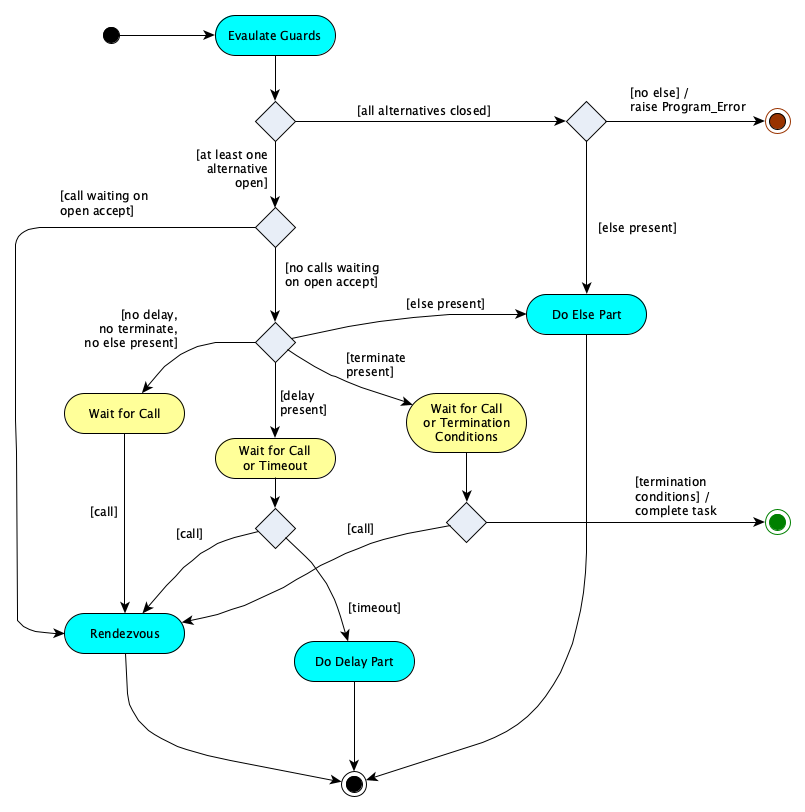
Execution begins with the evaluation of the guards ($G_1 \ldots G_n$ above). This determines which of the alternatives are open. After guard evaluation, execution continues as if the closed guards don’t even exist. If there are no open alternatives, then: (1) the else part is done if present, or (2) if no else part is present, then Program_Error is raised.
Again, there are a lot of rules, but hopefully you will see that they make sense.
- At least one alternative must be present.
- Each alternative must be:
- an
acceptstatement followed by zero or more statements, - a
delaystatement followed by zero or more statements, terminate
- an
- At least one of the alternatives must be an
accept. delay,terminate, andelseare mutually exclusive (which totally makes sense if you think about it).- You can have at most one
else(syntax restriction), at most oneterminate(semantic restriction), but you can have multipledelays. (Multiple delays have restrictions—look these up!) - Guards are actually optional! If a guard is missing, it is equivalent to
when True =>.
Example time. Assume the types Item (anything) and Index (a modular type) have been defined already. Here then is safe bounded buffer, implemented as a server task. (In practice, a protected object would be better, but this example is classic, and the idea of this actually appears in other languages, so it is good to know.)
task type Buffer is
   entry Put(I: Item);
   entry Get(I: out Item);
   entry Get_Size(S: out Natural);
end Buffer;

task body Buffer is
   Data: array (Index) of Item;
   Head, Tail: Index := 0;
   Count: Natural := 0;
begin
   loop
      select
         accept Put(I: Item) do
            Data(Tail) := I;
         end Put;
        Count := Count + 1;
        Tail := Tail + 1;
      or
         accept Get(I: out Item) do
            I := Data(Head);
         end Get;
        Count := Count - 1;
        Head := Head + 1;
      or
         accept Get_Size(S: out Natural) do
            S := Count;
         end Get_Size;
      or
         terminate;
      end select;
   end loop;
end Buffer;
The terminate alternative is selected if and only if: (1) the task depends on a completed master AND (2) all other dependents of this master have terminated or are blocked on a select call with an open terminate alternative.
If the terminate alternative is taken, the task becomes completed.
Here is the selective wait semantics as a picture:
Termination
A task is completed when it reaches the end of its body, or when it raises an exception that is not handled in the body (which is also a way to end up at the end of the body). Once completed, it begins its finalization process. A task is terminated (1) it has finalized and (2) all of its dependents have terminated.
A task depends on one or more masters. A master is not allowed to begin its finalization until after all of its dependents have terminated.
Here’s an illustration of how to find the masters of various tasks:
package P is
   task type Resource;
end P;
package body P is
   task body Resource is
      -- ...
   end Resource;
end P;
with P; use P;
package Q is
   task type Customer;
   type R_Pointer is access Resource;
   task Clerk is
      -- ...
   end Clerk;
end Q;
package body Q is
   task body Customer is
      -- ...
   end Customer;
   task body Clerk is
      -- ...
   end Clerk;
end Q;
with P, Q; use P, Q;
procedure R is
   task T1;
   task body T1 ... end;
   X: Resource;
   package Q is
      Y: Customer;
   end Q;
   procedure S is
      Z: Customer;
   begin ... end S;
   T2: R_Pointer;
begin
   B: declare
      task T3 is ... end T3;
      task body T3 is ... end T3;
   begin
      T2 := new Resource;
   end;
end R;
| Task | Masters |
|---|---|
| Clerk | P, R |
| T1 | R |
| X | R |
| Y | R |
| Z | S, R |
| T2.all | P, Q, R |
| T3 | B, R |
It’s possible for a task to terminate even if it never activates.
A task may terminate an still be in scope. If you try to call an entry on a terminated task, the exception Tasking_Error is raised. You can always query T'Terminated, which is true iff T has terminated.
T'Terminated for true. Why?
There’s also the attribute T'Callable, which is false iff T is completed, terminated, or abnormal. (We’ll talk about abnormal later.)
T'Callable for false. Why?
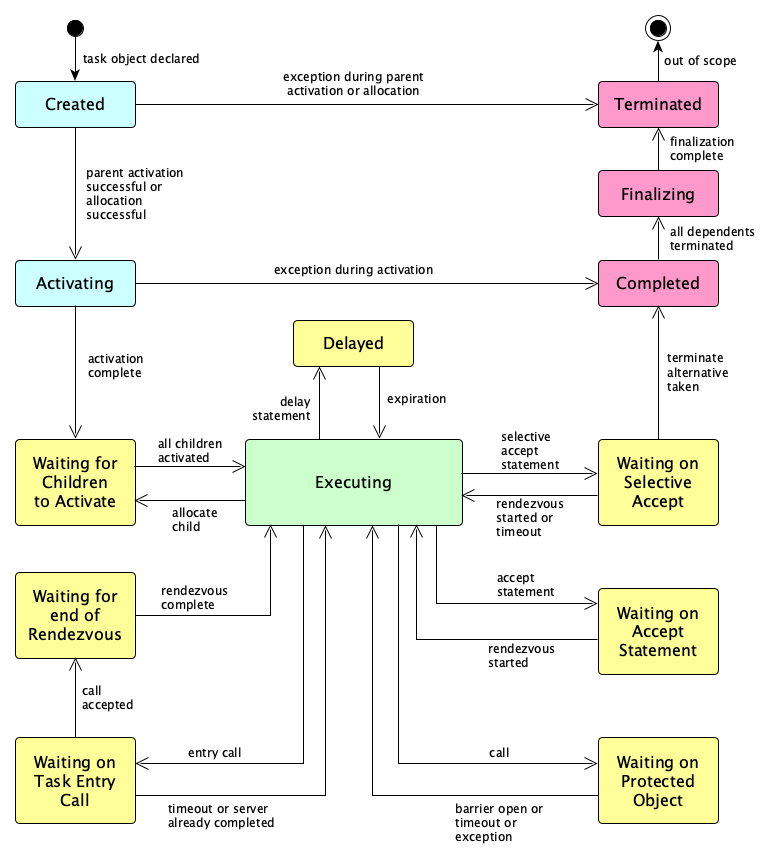
Task States
I made this diagram 25 years ago or so. I hope it is correct.
Protected Objects
Protected objects are the way Ada puts the resources in control of synchronization. They are like monitors but a bit more sophisticated — most everything you normally do in these cases is taken care of declaratively! There is that wonderful structured concurrency again. The bounded buffer example (shown in the context in which Index is defined as a modular type and Item is the type of objects to be stored in a buffer):
protected type Buffer is              -- SPECIFICATION
   entry Put(I: Item);               --
   entry Get(I: out Item);           --   Public part specifies:
   function Size return Natural;     --   entries, procedures, functions
private
   Data: array (Index) of Item;      --   Private part holds the shared
   Head, Tail: Index := 0;           --   data (this is in the spec so
   Count: Natural := 0;              --   the compiler knows how much space
end Buffer;                           --   to allocate for an object)

protected body Buffer is              -- BODY (operation bodies ONLY; no data)

    entry Put(I: Item) when Count < Index'Modulus is
    begin
        Data(Tail) := I;
        Count := Count + 1;
        Tail := Tail + 1;
    end Put;

    entry Get(I: out Item) when Count > 0 is
    begin
        I := Data(Head);
        Count := Count - 1;
        Head := Head + 1;
    end Get;

    function Size return Natural is
        return Count;
    end Size;

end Buffer;
How it works:
- Entries, procedures and functions by definition provide mutually exclusive access.
- Entries and procedures can read and write shared data; functions can only read. Thus, an implementation can optimize by allowing multiple function calls at the same time.
- Only entries have barriers. There is a queue associated with each entry "inside" the object.
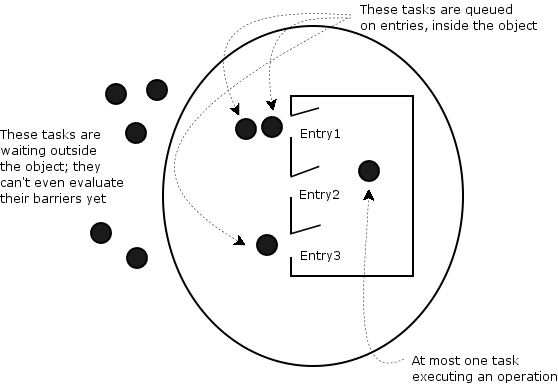
- When an entry is called the barrier is evaluated. If false, the calling task is queued on the entry.
- At the end of a procedure or entry body, barriers are reevaluated.
- Tasks already queued on entries have priority over tasks trying to get in. Therefore a caller can not even evaluate a barrier until the protected object is finished with the current and all queued tasks.
It's the programmer's responsibility to see that all barriers execute quickly and don't call a potentially blocking operation!
Advantages of protected objects (please read the Ada 95 Rationale section on protected types):
- Scalability
- Adaptability
- Modularity
- Efficiency
- Expressiveness
- Compatibility
- Great for implementing interrupt handlers
More Concurrency Features
There are a few more concurrency features that are worth mentioning, but we won’t go into too much detail here.
Atomics
Like many languages, Ada provides for atomic operations through procedures and functions that map directly to hardware support for these operations. These are found in the packages described in Section C.6 of the Reference Manual. The packages are:
System.Atomic_Operations.Test_And_Set:type Test_And_Set_Flag is mod implementation-defined function Atomic_Test_And_Set (Item: aliased in out Test_And_Set_Flag) return Boolean procedure Atomic_Clear (Item: aliased in out Test_And_Set_Flag) function Is_Lock_Free (Item: aliased Test_And_Set_Flag) return Boolean
System.Atomic_Operations.Exchange(parameterized by the type of the atomic variable $T$):function Atomic_Exchange (Item: aliased in out T; Value: T) return T function Atomic_Compare_And_Exchange ( Item: aliased in out T; Prior: aliased in out T; Desired: T) return Boolean function Is_Lock_Free (Item: aliased T) return BooleanSystem.Atomic_Operations.Integer_ArithmeticSystem.Atomic_Operations.Modular_Arithmetic
(both parameterized by the type of the atomic variable $T$):procedure Atomic_Add (Item: aliased in out T; Value: T) procedure Atomic_Subtract (Item: aliased in out T; Value: T) function Atomic_Fetch_And_Add (Item: aliased in out T; Value: T) return T function Atomic_Fetch_And_Subtract (Item: aliased in out T; Value: T) return T function Is_Lock_Free (Item: aliased T) return Boolean
Synchronized Queues
The standard library has three packages for sychronized queues, found starting at Section A.18.27 of the Reference Manual. Here’s the main package:
generic
   type Element_Type is private;
package Ada.Containers.Synchronized_Queue_Interfaces
   with Pure, Nonblocking, Global => null is

   type Queue is synchronized interface;

   -- Blocks if the queue has a maximum capacity and is full
   procedure Enqueue (Container: in out Queue; New_Item: in Element_Type) is abstract
      with
         Synchronization => By_Entry,
         Nonblocking => False,
         Global'Class => in out synchronized;

   -- Blocks if empty
   procedure Dequeue (Container: in out Queue; Element: out Element_Type) is abstract
      with
         Synchronization => By_Entry,
         Nonblocking => False,
         Global'Class => in out synchronized;

   -- Current number of items in the queue
   function Current_Use (Container: Queue) return Count_Type is abstract
      with
         Nonblocking,
         Global'Class => null,
         Use_Formal => null;

   -- Maximum number of items that have been in the queue at any one time
   function Peak_Use (Container: Queue) return Count_Type is abstract
      with
         Nonblocking,
         Global'Class => null,
         Use_Formal => null,
         Post'Class => Peak_Use'Result >= Current_Use (Container);
end Ada.Containers.Synchronized_Queue_Interfaces;
Requeue
Ada has a requeue statement to help with condition synchronization. The rendezvous or protected call can’t do everything! In particular, it cannot make the choice on blocking based on the parameters of the entry call. Nor can it handle a service that needs to be done in two steps.
This statement is well described in Section 9.2 of the Rationale, which includes examples. You can find the precise details in Section 9.5.4 of the Reference Manual.
ATC
Ada’s asynchronous transfer of control mechanism is described in Section 9.4 of the Rationale and defined officially in Section 9.7.4 of the Reference Manual.
ATC is a way to transfer control from one task to another, without waiting for the first task to finish. It is used for things like interrupt handling, error recovery, unexpected mode changes, deadline overrun detection, or convergent computation with approximations. It needs to be used carefully.
Abort
Ada has a controversial abort statement. It marks a task, and all of its dependents abnormal, which means a lot of things. Most people don’t use it, as it is dangerous and has so many nasty ramifications, including race conditions and other cases in which the program is highly unpredictable. ATC is often a better, safer option.
Official details are in Section 9.8 of the Reference Manual. You might find the paper Ada’s Abort Statement: License to Kill a good read.
Pro TipJust place
pragma Restrictions (No_Abort_Statements);at the top of your compilation unit, then any use of this statement becomes a compiler error.
Exceptions
Okay, this is tricky. Exceptions are always tricky in concurrent programming.
Exceptions During Activation
The interesting cases for exceptions raised during activation are described in this example:
procedure P is task T1; task T2; -- If an exception occurs here, during the elaboration -- of the declarative part of P, both T1 and T2 become -- TERMINATED, without ever having a chance to activate. task body T3 is -- If an exception occurs here, during the elaboration -- of the declarative part of T3, T3 becomes COMPLETED -- (allowing it to finalize). There is no effect on T1 -- or T2. However, as P has to wait for T3 to finish -- activating, and T3 never finishes activating, Ada -- causes a Tasking_Error exception to be raised in P, -- right at itsbegin. begin -- ... end T3; -- ... begin -- ... end P;
The rule that Tasking_Error is raised in the parent whenever a tasks raises an exception during its activation is a general one. It also applies to tasks created dynamically.
Exceptions During Execution
There are a few interesting cases to note during execution:
- If a client attempts to rendezvous (call an entry) with a server that is already completed, terminated, or abnormal, a
Tasking_Erroris raised at the point of call. - If an exception is raised but not handled in an
acceptstatement, it is propagated to both the client and server. - If an exception is raised but not handled by a protected operation (of a protected object), it is simply propagated to the caller.
- If (1) an exception is raised while evaluating a protected entry’s barrier, (2) a protected operation tries a potentially blocking operation, or (3) finalization of an object is attempted with tasks on one or more its entry queues, then
Program_Erroris raised.
Examples
There are some useful and runnable examples over at my Programming Languages Explorations site. In the Ada folder you’ll find examples for:
- A thread-safe abstract data type for sets, implemented with a protected type (sets.ads, sets.adb)
- A package with persistent and transient signals (signals.ads, signals.adb)
- A package for binary events (events.ads, events.adb)
- An illustration of both secure and insecure resource allocators (resource_allocators.ads, resource_allocators.adb)
What’s Next?
We’ve only covered the basic model here.
The next things to study would be:
- Parallel Programming Support, including parallel loops and blocks (ARM 5.6.1)
- System Programming Facilities, such as device drivers, interrupt handling, timers, and working with task identification and attributes (ARM Annex C)
- Real-time Facilities, such as scheduling policies, priorities, dynamic priorities, monotonic time, synchronization primitives, and delay accuracy (ARM Annex D)
- Distributed System Facilities, such as partitions, RPC, distributed objects, replication, and fault-tolerance (ARM Annex E)
- Static Detection of data races and potential blocking.
Summary
We’ve covered:
- Core ideas of the Ada concurrency model
- Tasks declarations
- Task lifecycle: activation, execution, termination
- Communication
- Task states
- Protected objects
- A handful of features
- Exceptions in Ada concurrency