Internet Applications
Unit Goals
Examples of Applications
An Internet application does something for end users. It is generally not concerned with how data is actually transmitted between the hosts. Here are some distributed applications that require well-defined application level protocols:
- Sending and receiving email
- Searching and browsing information archives
- Copying files between computers
- Conducting financial transactions
- Navigating (in your car, smart scooter, smart bike, or other)
- Playing interactive games
- Video and music streaming
- Chat or voice communication (direct messaging, video conferencing)
In addition, there are a number of network services such as:
- Name servers
- Configuration servers
- Mail gateways, transfer agents, relays
- File and print servers
Review of Layers
Remember how the Internet was said to be so well designed you never think about it? Here’s one bit of evidence: all Internet applications work over the exact same transport layers. The Internet says nothing about how these application should work. It provides IP and TCP and UDP and that’s it. You can build anything on top of those.
Applications pretty much just need to know: (1) the IP address of the other party (what host the other party is running on—a network layer concept), and (2) the port number of the application running at the other end (because the other machine might be running multiple services—a transport layer concept). It passes those two pieces of information to the transport layer to make the communication happen.
| APPLICATION LAYER (HTTP, FTP, SMTP, ...) |
| TRANSPORT LAYER (TCP, UDP, ...) |
| NETWORK LAYER (IP) |
| LINK LAYER (Ethernet, Wifi, ...) |
IP Addresses for Hosts
A host address will be 32 bits for IPv4 and 128 bits for IPv6.
IPv4 host addresses are usually written in dotted-quad notation, with each of its four octets written in decimal (0...255, inclusive), e.g., 27.253.1.199.
IPv6 host addresses are usually written in hex with its eight hextets separated by colons, e.g., fe80:0:3:0:a299:cff:18:57d1.
Port Numbers
Once packets get to the right machine, they have to get to the right program running on that machine. The abstraction here is the port number. Port numbers are in the range 0..65535.
On the Internet, port numbers are partitioned as follows:
- 0...1023 are the System Ports, assigned by the IETF Review or IESG Approval procedures described in RFC 8126.
- 1024...49151 are the User Ports, assigned by IANA using the IETF Review process, the "IESG Approval" process, or the "Expert Review" process, as per RFC 6335.
- 49152...65535 are the Dynamic Ports, which are unrestricted, do with them whatever you want.
The authoritative list of port number assignments is published by IANA and is called the Service Name and Transport Protocol Port Number Registry. It is worth browsing! Here are some highlights in the meantime:
    7 echo
    9 discard
   13 daytime
   17 qotd
   19 chargen
   20 ftp-data
   21 ftp
   22 ssh
   23 telnet
   25 smtp
   37 time
   43 nicname (WHOIS)
   49 login
   53 domain (DNS)
   69 tftp
   70 gopher
   79 finger
   80 http
   88 kerberos
  110 pop3
  115 sftp
  119 nntp
  123 ntp
  143 imap
  179 bgp
  194 irc
  389 ldap
  443 https
  458 quicktime
  540 uucp
  546 dhcpv6-client
  547 dhcpv6-server
  563 nntps
  565 whoami
  636 ldaps
  691 msexch-routing
  765 webster
  992 telnets
  995 pop3s
 1194 openvpn
 1433 ms-sql-s
 1649 kermit
 1833 msnp
 2049 nfs
 3074 xbox
 3306 mysql
 3689 daap (iTunes)
 3724 blizwow
 5190 aol (AIM)
 5432 postgresql
 6000 x11
 6346 gnutella-svc
 6347 gnutella-rtr
 7474 neo4j
26000 quake
33434 traceroute
Here are some other excellent partial lists:
Sockets
So hosts have IP addresses and applications run on specific ports. But how to we program with that info. Generally, there is an O.S.-level data structure called a socket consisting of:
- The remote IP address
- The remote port number
- The local IP addresses
- The local port number
- A message queue
It’s likely that the O.S. provides a blocking read_socket call, which blocks until a message is available. It looks something like:
read_socket(socket_descriptor, &buffer, number_of_bytes_to_read)
When a datagram arrives form the network, the link layer passes it to the network layer which passes it to the transport layer, where the port number is extracted. The O.S. uses the port number to send the data to the right application. If a thread is waiting there, the correct amount of data is copied into the buffer and the thread gets unblocked.
Writing Your Own Internet Applications
There are two main paradigms: Client-Server and Peer-to-Peer (P2P).
Client-Server
The most common is client-server.
- Server: the application (not the machine) that passively waits for contact. Generally reside on big machines and can serve many clients simultaneously. Servers often have fixed, permanent IP addresses. They don’t know in advance who the clients are.
- Client: application (not the machine) that actively initiates contact. Generally runs on end users’ devices.
Once connection is established, the clients and servers can talk back and forth to each other any way they want. (Clients don’t talk to each other.)
In order to "fairly" handle multiple simultaneous clients, a server should
- Be multithreaded,
- Fork copies of itself, OR
- Be event-driven
Multi-threaded servers have code that looks like this:
while (true) {
    Connection c = waitForConnection();
    spawnANewThreadToHandle(c); // or submit to task to thread pool
}
Event-driven servers would look like:
server.on('connect', (connection) => {
  connection.on('somemessage1', (data) => handlerForMessage1());
  ...
  connection.on('somemessageN', (data) => handlerForMessageN());
}
But now we have many clients talking simultaneously to the service which is "running on" a fixed port. How are these distinguished?
When a client's connection request is granted by the server, networking software on the client gets a port for the client to run on. If there are multiple clients on the same host, they will each have different port numbers. The server, then, uses the combination of client IP address + client port number to know exactly which connection is being referred to. Example:
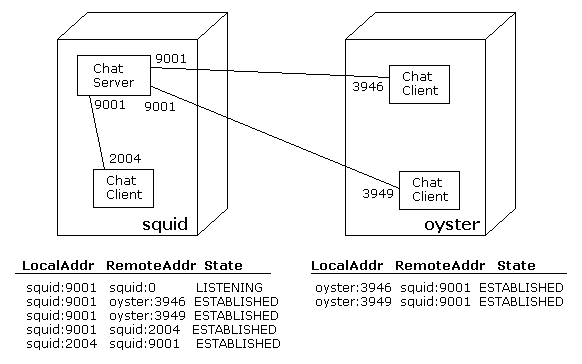
When writing programs, your programming language will have some kind of library to create and manage these connections, and to send and receive data through them. The abstraction for a connection is called a socket. A socket API will often look something like this:
socket()- Create a socket (whether it is TCP or UDP or anything else is a parameter)
bind()- Bind IP address and port to socket
setsockopt()- Set socket options (configure socket)
getsockopt()- Get socket options (get configuration)
listen()- (Server) wait for a connection
accept()- (Server) accept a connection from client
getpeername()- (Server) get IP address of connected client
connect()- (Client) Initiate connection with server
send()- Send data
recv()- Receive data
sendmsg()- Send a message
recvmsg()- Receive a message
close()- Terminate connection
Most programming languages layer higher-level constructs over this low-level socket API. You’ll commonly see things like classes for “server sockets” that automatically bind and listen, or various events that replace blocking calls. Sometimes you can create streams that abstract away repeated calls to send and receive.
See the following pages for socket-based programming examples in:
Peer-to-Peer
In P2P systems there is no “always on” server. Clients communicate with each other, even though clients’ IP addresses may change.
Application Design Considerations
When designing an application, ask yourself:
- Must every bit arrive perfectly, or can we tolerate some data loss?
- How important is throughput and delay? Do we need all the data in a certain amount of time, or can we wait?
- Where in the app do we handle security, privacy, and data integrity concerns?
For Internet applications, the lossiness question is answered by choosing TCP or UDP. Regardless of the type of transport layer, there’s a good chance the library providing these services uses sockets. Use Internet sockets, a.k.a. Berkeley sockets for communication to different hosts. (The Unix domain sockets comprise a different interface for use within a single host.)
Though we’ll see these protocols later, for now, know this:
| TCP | UDP | |
|---|---|---|
| Reliable? | ✅ | ❌ |
| Flow controlled? | ✅ | ❌ |
| Congestion controlled? | ✅ | ❌ |
| Connection setup required? | ✅ | ❌ |
| Timing guarantees? | ❌ | ❌ |
| Throughput guarantees? | ❌ | ❌ |
| Security baked in? | ❌ | ❌ |
In a TCP-based app, each party talks to each other with (theoretically unbounded) streams of data. This is more common.
In a UDP-based app, each party speaks to each other in brief messages, called datagrams. Common in multi-party apps talking to each other (e.g., online games, multimedia where losing a few packets doesn’t matter so much).
Security is handled by applications themselves. The app can use an SSL (secure sockets layer) library, which understands TCP and essentially creates an encrypted TCP connections. Details later.
Some Existing Internet Applications
Here are some well-known Internet applications. Some of these are pretty old-school and might not exist on your machine, or even on any actual accessible machine (as most people lock down their servers pretty tightly these days, closing all ports but a selected few), but the RFCs will stay around forever.
A really nice read is RFC 2151, from 1997. Called A Primer on Internet TCP/IP Tools and Utilities, it is a lovely look at early Internet services. A must read for anyone interested in Internet history and evolution.
| Application | RFC | Port | Description |
|---|---|---|---|
| Daytime | 867 | 13 | When a client connects, the server sends back a string with the current date and time, then immediately closes the connection. (From the RFC: “There is no specific syntax for the daytime. It is recommended that it be limited to the ASCII printing characters, space, carriage return, and line feed. The daytime should be just one line.” |
| Time | 868 | 37 | When a client connects, the server sends back a 32-bit time value, then immediately closes the connection. (From the RFC: “The time is the number of seconds since 00:00 (midnight) 1 January 1900 GMT, such that the time 1 is 12:00:01 am on 1 January 1900 GMT; this base will serve until the year 2036.” |
| Quote of the Day | 865 | 17 | When a client connects, the server sends back a short message then immediately closes the connection. (From the RFC: “There is no specific syntax for the quote. It is recommended that it be limited to the ASCII printing characters, space, carriage return, and line feed. The quote may be just one or up to several lines, but it should be less than 512 characters.” |
| Active Users | 866 | 11 | When a client connects, the server sends back a list of the currently active users then immediately closes the connection. (From the RFC: “There is no specific syntax for the user list. It is recommended that it be limited to the ASCII printing characters, space, carriage return, and line feed. Each user should be listed on a separate line.” |
| Discard | 863 | 9 | Send it whatever you want. It won't send back anything. This goes on until the client forcibly closes the connection. |
| Echo | 862 | 7 | Whatever you send it, it sends back. This goes on until the client forcibly closes the connection. |
| Chargen | 864 | 19 | When a client connects, the server sends back data. And keeps sending back data. This goes on until the client forcibly closes the connection. “The data may be anything. It is recommended that a recognizable pattern be used in the data.” |
| Finger | 1288 | 79 | The client requests information about a person on the remote machine; the server sends back the information and close the connection. |
| DNS | 1035 | 53 | Clients ask the name service questions, usually of the type "what is the ip address for this domain name?" and the server responds with an answer of some sort. |
| Trivial File Transfer | 1350 | 69 udp | TFTP. Much weaker than FTP, but is lightweight and simple. The sender and receiver exchange files packet by packet in lock step, with acknowledgements being part of the protocol itself. |
| Gopher | 1436 | 70 | Clients issue a request (an "item selector") for information and the server sends it back. Sounds a lot like WWW, but the information repositories are much more rigid. Not used much anymore. |
| Simple Mail Transfer | 2821 | 25 | SMTP. A very simple protocol for sending email. |
| Mailbox Access with POP3 | 1939 | 110 | A simple protocol for managing email. |
| Mailbox Access with IMAP | 3501 | 143 | A modern alternative to POP3. IMAP clients can stay connected for longer times than POP3 clients, can have multiple clients attached to the same mailbox simultaneously, keep state on the server, fetch partial messages, and do other cool things. |
| File Transfer | 959 | 21 | A fully featured file transfer application using the File Transfer Protocol, FTP. Server runs on port 21 with data transferred through port 20. |
| World Wide Web | 7230-7235 | 80 | Servers usually run on port 80 (clear) or port 443 (secure) but really could run anywhere. Clients request resources via a uniform resource identifier (URI) and the server responds to the request. Request and response structures are quite detailed. The resources can be absolutely anything (so the responses usually contain a media type in their header). |
| News | 3977 | 119 | Network News Protocol, NNTP. Used for the reading and writing news articles structured into newsgroups. |
| Telnet | 854 | 23 | A very, very, generic communication protocol. |
| Secure Shell | 4250-4256 | 22 | A protocol for secure remote login, file transfer, and more. |
Summary
We’ve covered:
- Examples of Internet applications
- What Internet applications are for
- How client-server programs are architected
- Example application layer services and the RFCs that define them