Java SE Graphics
Java Platforms and Graphics
Java developers normally do their work in one of several platforms:
- Java SE, for general-purpose applications
- Java EE, for enterprise applications
- Java ME, for mobile applications
- JavaFX, for rich client applications
- Java Card, for smart cards
Most graphics applications will use JavaFX, which is super rich, even featuring support for 3D scene graphs. However, Java SE does have some basic support for graphics! We’ll look at a few examples here.
Simple Drawing
Our first program draws a Do Not Enter sign in a new window.
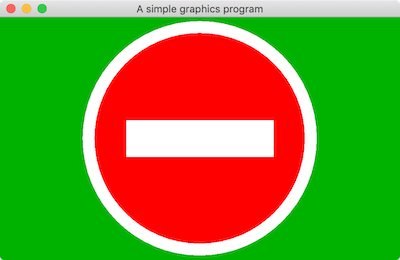
Here’s the app:
import module java.desktop;

/**
 * A panel maintaining a picture of a Do Not Enter sign.
 */
class DoNotEnterSignPanel extends JPanel {
    private static final long serialVersionUID = 1L;

    @Override
    public void paintComponent(Graphics g) {
        super.paintComponent(g);

        var cx = getWidth() / 2;
        var cy = getHeight() / 2;
        var radius = Math.min(getWidth() / 2, getHeight() / 2) - 5;
        var diameter = radius * 2;
        var innerRadius = (int) (radius * 0.9);
        var innerDiameter = innerRadius * 2;
        var barWidth = (int) (innerRadius * 1.4);
        var barHeight = (int) (innerRadius * 0.35);

        g.setColor(Color.WHITE);
        g.fillOval(cx - radius, cy - radius, diameter, diameter);
        g.setColor(Color.RED);
        g.fillOval(cx - innerRadius, cy - innerRadius, innerDiameter, innerDiameter);
        g.setColor(Color.WHITE);
        g.fillRect(cx - barWidth / 2, cy - barHeight / 2, barWidth, barHeight);
    }
}

/**
 * An app that displays a Do Not Enter sign panel in a window.
 */
void main() {
    SwingUtilities.invokeLater(() -> {
        var panel = new DoNotEnterSignPanel();
        panel.setBackground(Color.GREEN.darker());
        var frame = new JFrame("You Shall Not Pass");
        frame.setSize(400, 300);
        frame.setDefaultCloseOperation(WindowConstants.EXIT_ON_CLOSE);
        frame.getContentPane().add(panel, BorderLayout.CENTER);
        frame.setVisible(true);
    });
}
Let’s break it down, and learn the basics as we go:
- The drawing is defined to be a
JPanel, which comes from the packagejavax.swingfrom the modulejava.desktop. A jpanel is a component you can draw in. - Every time the system detects that a component needs to be painted (e.g., it is made visible for the first time, or its window was resized), it (eventually) calls its
paintComponentmethod and passes it aGraphicsobject. So doing graphics in Java is all about writing components and defining theirpaintComponentmethod. - You can read the component’s current size at any time with the graphics object’s
getWidth()andgetHeight()methods. Often, but not always, your drawing will be relative to these values. - The upper-left corner of the component is at (0,0). x-coordinates increase to the right; y-coordinates increase to the bottom.
- The graphics object is the thing with the power. Browse the documentation for this class now.
- To draw or fill ovals and rectangles, you specify the upper-left coordinates, the width, and the height. Set the color before drawing with
setColor. - To learn about
serialVersionUID, ask you favorite chatbot. - We’ve supplied a separate
mainmethod that shows how an actual Swing application works. It creates a frame that gets sized, receives components to contain, is told what to do on close, and is made visible. - Operations on components should happen on a special thread known as the event dispatch thread, or EDT. The
paintComponentmethod already runs on this thread. But to get our initializing code to run on the EDT, we pass it toSwingUtilities.invokeLater.
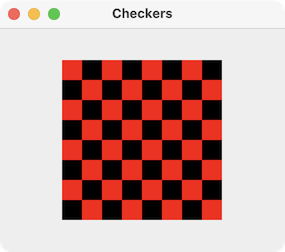
The Do Not Enter sign drawing is sized relative to a panel that can grow and shrink. But suppose we want a fixed size drawing, that stays centered within its panel. And suppose further we want our containing frame to never get smaller than the drawing. The following app shows how to do that, rendering a simple checkerboard:
import module java.desktop;

/*
 * A panel that displays a checkerboard pattern of a fixed size.
 */
class CheckerboardPanel extends JPanel {

    private static final long serialVersionUID = 1L;
    private static int SIZE = 20;
    private static int ROWS = 8;
    private static int COLUMNS = 8;

    public CheckerboardPanel() {
        setPreferredSize(new Dimension(SIZE * COLUMNS, SIZE * ROWS));
        setMaximumSize(getPreferredSize());
        setMinimumSize(getPreferredSize());
        setBackground(Color.WHITE);
    }

    @Override
    public void paintComponent(Graphics g) {
        super.paintComponent(g);
        for (var row = 0; row < ROWS; row++) {
            for (var column = 0; column < COLUMNS; column++) {
                g.setColor(row % 2 == column % 2 ? Color.RED : Color.BLACK);
                g.fillRect(row * SIZE, column * SIZE, SIZE, SIZE);
            }
        }
    }
}

/**
 * An app that displays the checkerboard panel in a window.
 */
void main() {
    SwingUtilities.invokeLater(() -> {
        var panel = new CheckerboardPanel();
        var frame = new JFrame("Checkers");
        frame.setDefaultCloseOperation(WindowConstants.EXIT_ON_CLOSE);

        // Make sure the panel is centered in the frame
        var contentPane = frame.getContentPane();
        contentPane.setLayout(new GridBagLayout());
        contentPane.add(panel);
        frame.pack();

        // Don't let the frame be resized smaller than the panel
        var insets = frame.getInsets();
        var minWidth = panel.getPreferredSize().width + insets.left + insets.right;
        var minHeight = panel.getPreferredSize().height + insets.top + insets.bottom;
        frame.setMinimumSize(new Dimension(minWidth, minHeight));

        frame.setVisible(true);
    });
}
Sketching
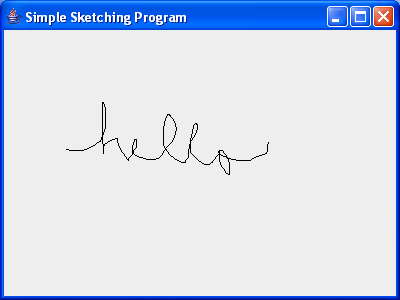
Our first example was just a static drawing. Time to learn about interactive computer graphics. This means learning about events.Here is a little canvas you can sketch on, with a little main method so it can be run as an application:
import module java.desktop;
import java.util.List;
import java.awt.Point;
import java.awt.event.MouseEvent;

class SimpleSketchPanel extends JPanel {

    private static final long serialVersionUID = 1L;
    private List<List<Point>> curves = new ArrayList<>();

    public SimpleSketchPanel() {
        // Register event listeners on construction of the panel.
        addMouseListener(new MouseAdapter() {
            public void mousePressed(MouseEvent e) {
                var newCurve = new ArrayList<Point>();
                newCurve.add(new Point(e.getX(), e.getY()));
                curves.add(newCurve);
            }
        });

        addMouseMotionListener(new MouseMotionAdapter() {
            public void mouseDragged(MouseEvent e) {
                curves.get(curves.size() - 1).add(new Point(e.getX(), e.getY()));
                repaint(0, 0, getWidth(), getHeight());
            }
        });
    }

    public void paintComponent(Graphics g) {
        super.paintComponent(g);
        for (var curve: curves) {
            var previousPoint = curve.get(0);
            for (var point: curve) {
                g.drawLine(previousPoint.x, previousPoint.y, point.x, point.y);
                previousPoint = point;
            }
        }
    }
}

/**
 * An application that displays a simple sketching program in a window.
 */
void main() {
    SwingUtilities.invokeLater(() -> {
        var frame = new JFrame("Simple Sketching");
        frame.getContentPane().add(new SimpleSketchPanel(), BorderLayout.CENTER);
        frame.setDefaultCloseOperation(JFrame.EXIT_ON_CLOSE);
        frame.setSize(400, 300);
        frame.setVisible(true);
    });
}
The panel saves the state of the drawing as a list of curves, where each curve is a list of points. Pressing the mouse button starts a new curve; dragging the mouse adds the current location of the mouse to the current curve. The entire drawing is rendered when needed, as usual, in paintComponent().
Notice the call to repaint when dragging. This tells Java to redraw the panel as soon as it can.
repaint call. Try out the application now. What did you notice? Explain why you think this new behavior occurred.
Graphical User Interfaces
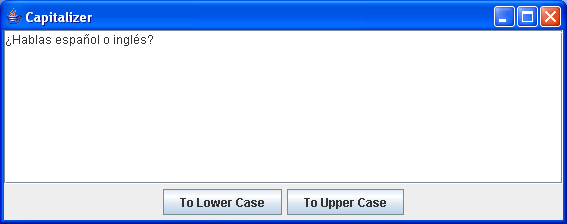
Here is a program with a text area and a couple of buttons. We’ll cover it in class.
import module java.desktop;

void main() {
    SwingUtilities.invokeLater(() -> {
        var initialText = "¿Hablas español o inglés o ambos?";
        var area = new JTextArea(initialText, 8, 50);

        var lowerCaseButton = new JButton("To Lower Case");
        var upperCaseButton = new JButton("To Upper Case");
        lowerCaseButton.addActionListener(_ -> area.setText(area.getText().toLowerCase()));
        upperCaseButton.addActionListener(_ -> area.setText(area.getText().toUpperCase()));

        var buttonPanel = new JPanel();
        buttonPanel.add(lowerCaseButton);
        buttonPanel.add(upperCaseButton);

        var frame = new JFrame("Capitalizer");
        frame.setDefaultCloseOperation(JFrame.EXIT_ON_CLOSE);
        frame.getContentPane().add(new JScrollPane(area), BorderLayout.CENTER);
        frame.getContentPane().add(buttonPanel, BorderLayout.SOUTH);
        frame.pack();
        frame.setVisible(true);
    });
}
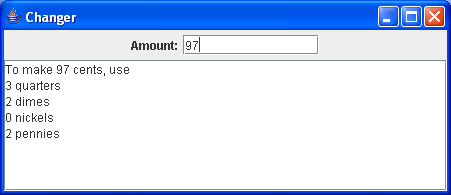
Buttons are boring. It’s so much better to see things happen while you type. Here is a program that reacts for each change to its input field.
import module java.desktop;
import javax.swing.text.Document;
import javax.swing.event.DocumentEvent;

/**
 * A little GUI application that lets you type in an amount of cents in a text
 * field and see a report of how to make that amount with the fewest number of
 * pennies, dimes, nickels and quarters.
 */
public class Changer extends JFrame {

    private static final long serialVersionUID = 1L;
    private JTextField amountField = new JTextField(12);
    private Document amountText = amountField.getDocument();
    private JTextArea report = new JTextArea(8, 40);

    public Changer() {
        var topPanel = new JPanel();
        topPanel.add(new JLabel("Amount:"));
        topPanel.add(amountField);
        getContentPane().add(topPanel, BorderLayout.NORTH);
        getContentPane().add(new JScrollPane(report), BorderLayout.CENTER);

        setBackground(Color.LIGHT_GRAY);
        report.setEditable(false);

        amountText.addDocumentListener(new DocumentListener() {
            public void changedUpdate(DocumentEvent e) {
                updateReport();
            }

            public void insertUpdate(DocumentEvent e) {
                updateReport();
            }

            public void removeUpdate(DocumentEvent e) {
                updateReport();
            }
        });
    }

    void updateReport() {
        try {
            var amount = Integer.parseInt(amountText.getText(0, amountText.getLength()));
            report.setText("To make " + amount + " cents, use\n");
            report.append(amount / 25 + " quarters\n");
            amount %= 25;
            report.append(amount / 10 + " dimes\n");
            amount %= 10;
            report.append(amount / 5 + " nickels\n");
            amount %= 5;
            report.append(amount + " pennies\n");
        } catch (NumberFormatException _) {
            report.setText("Not an integer or out of range");
        } catch (Exception e) {
            report.setText(e.toString());
        }
    }
}

void main() {
    SwingUtilities.invokeLater(() -> {
        var frame = new Changer();
        frame.setTitle("Changer");
        frame.pack();
        frame.setDefaultCloseOperation(JFrame.EXIT_ON_CLOSE);
        frame.setVisible(true);
    });
}
An Example with Threads
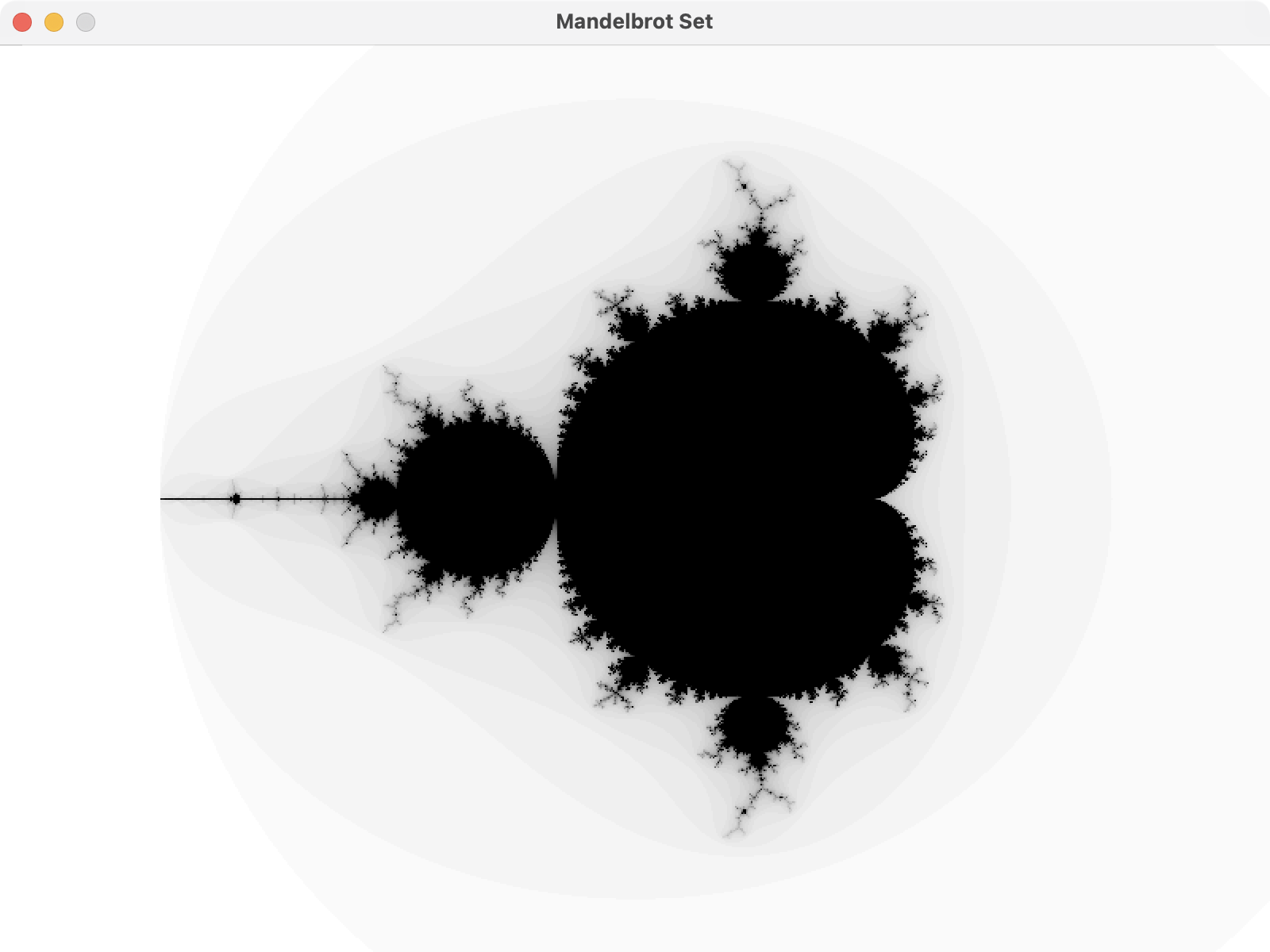
This example draws a Mandelbrot set using a bunch of threads:
import module java.desktop;

static double left = -2.5;
static double right = 1.5;
static double bottom = -1.5;
static double top = 1.5;
static int maxIterations = 50;

/**
 * A panel for drawing a Mandelbrot set.
 */
class MandelbrotPanel extends JPanel {
    private static final long serialVersionUID = 1L;

    /**
     * Determines the color of the point x+yi in the Mandelbrot set, based on the
     * value of maxIterations. For now, a hard-coded gradient is used; this should
     * be parameterized.
     */
    static Color colorFor(double x, double y) {
        var zx = 0.0;
        var zy = 0.0;
        for (var i = 0; i < maxIterations; i++) {
            var cx = zx * zx - zy * zy + x;
            var cy = 2.0 * zx * zy + y;
            zx = cx;
            zy = cy;
            if (cx * cx + cy * cy >= 4.0) {
                var shade = 255 - (255 * i / maxIterations);
                return new Color(shade, shade, shade);
            }
        }
        return Color.BLACK;
    }

    record Plotter(int col, int row, double x, double y, Graphics g) implements Runnable {
        public void run() {
            var color = colorFor(x, y);
            SwingUtilities.invokeLater(() -> {
                g.setColor(color);
                g.fillRect(col, row, 1, 1);
            });
        }
    }

    /**
     * Generates the picture using a thread pool running tasks that are each
     * responsible for coloring a single pixel.
     */
    public void generate() {
        try (var pool = Executors.newFixedThreadPool(32)) {
            var width = this.getWidth();
            var height = this.getHeight();
            var dx = (double)(right - left) / width;
            var dy = (double)(bottom - top) / height;
            var g = getGraphics();

            var y = top;
            for (var row = 0; row < height; row++, y += dy) {
                var x = left;
                for (var col = 0; col < width; col++, x += dx) {
                    pool.execute(new Plotter(col, row, x, y, g));
                }
            }
        }
    }
}

void main() {
    SwingUtilities.invokeLater(() -> {
        var frame = new JFrame("Mandelbrot Set");
        frame.setDefaultCloseOperation(JFrame.EXIT_ON_CLOSE);
        frame.setSize(1024, 768);
        frame.setLocationRelativeTo(null);
        frame.setLayout(new BorderLayout());
        var panel = new MandelbrotPanel();
        frame.getContentPane().add(panel);
        frame.setResizable(false);
        frame.setVisible(true);
        panel.generate();
    });
}
newFixedThreadPool(32) with newVirtualThreadPerTaskExecutor(). What effect do you see, if any?
Summary
We’ve covered:
- Java Platforms
- Basic Drawing
- Sketching
- GUIs
- Where to go for more advanced graphics