Family Archives LAB10
Welcome
You know what computers are good at? Record keeping. And speeding up our searches.
Perhaps you’d like information about your family. Not just your direct ancestors, but siblings and cousins and great aunts and whatever the “$k$th cousin $n$ times removed” means. Let’s learn how to represent these connections between people, and write some code to navigate these structures to answer questions.
Along the way, we are going to learn a new and powerful feature of Python: the ability to create new types. Yes, Python gives us a lot to start with: integers, floats, booleans, strings, tuples, lists, dictionaries, a dozens we’ve not seen yet. But to make our programs more readable and close to what we are modeling, we’ll see that creating our own types is sleek.
What We Will Learn
== vs is
Reference values
Variables vs. Objects
Classes
Recursive structures
Activity
Here is a family tree for some random person I found on Wikitree:
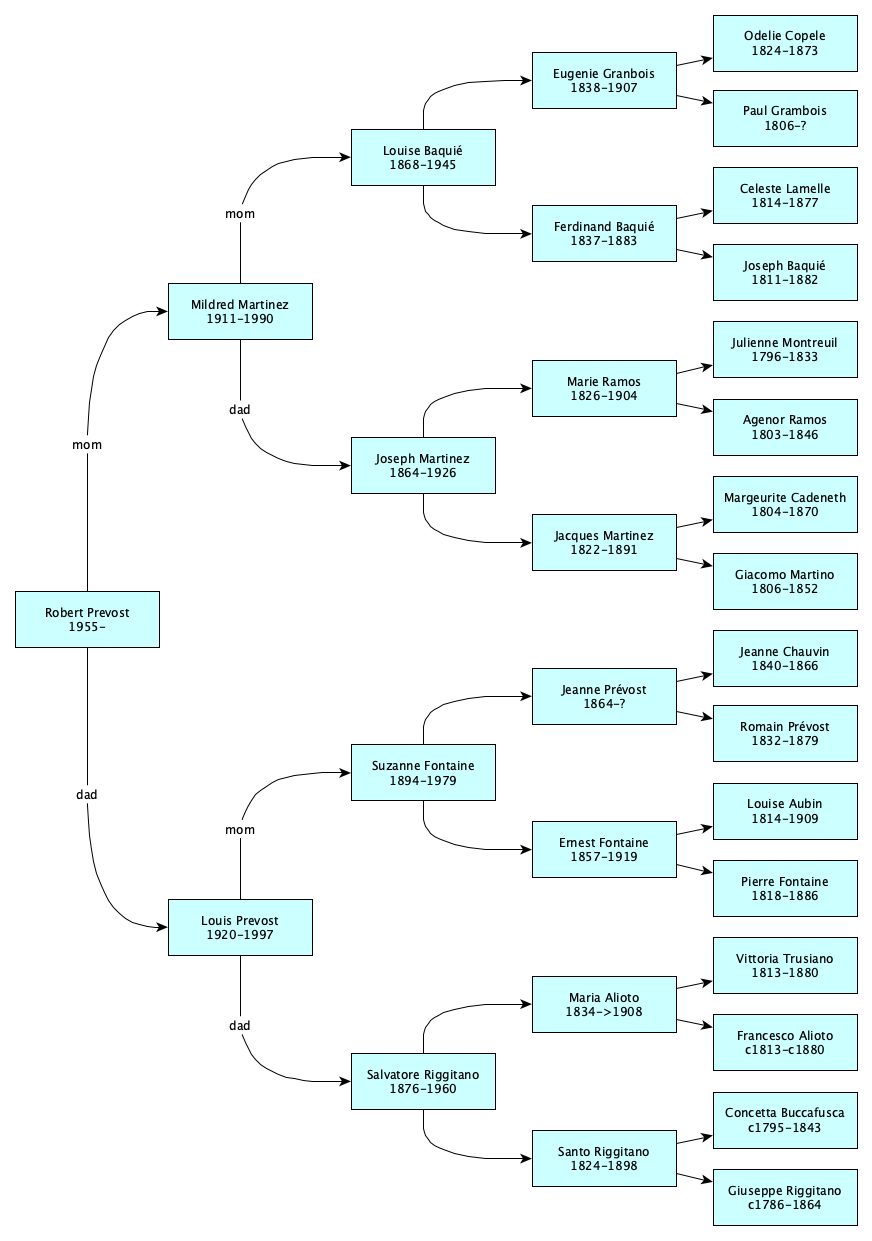
What do each of those rectangles represent? Booleans? Numbers? Strings? Tuples? Sets? Dictionaries?
No, they are people.
Python does not have a type for people. But it has a way to make new types! So let’s make one.
Classes
So we want to make a new type for people. We start by determining the attributes of a person. We’ll pick five: name, born, died, mom, and dad.
New types are created as classes in Python. Here’s super basic Person class:
class Person:
    def __init__(self, name, born=None, died=None, mom=None, dad=None):
        self.name = name
        self.born = born
        self.died = died
        self.mom = mom
        self.dad = dad

The class is not a person itself, but only the description of a person. To make actual person objects, we do this:
julie = Person("Julienne Montreuil", born="1796", died="1833")
agenor = Person("Agenor Ramos", born="1803", died="1846")
marie = Person("Marie Ramos", born="1826", died="1904", mom=julie, dad=agenor)
To make an object, you use the class name like a function—e.g. Person(...)—but it is the class's __init__ method that gets called.
Method?A function that is inside a class is called a method. I don’t make the rules.
The interesting thing about methods is that they usually (almost always) have a first parameter that you don’t pass in directly. This parameter refers to the object of the class that you are interested in. For the special method __init__, this first parameter, that everyone calls self, is the person object being created. It is typical for __init__ to assign its parameters to the new object’s attributes. And because methods are functions, it’s common to make some of the parameters have defaults.
Let’s write some code. Create the file ~/cmsi1010/lab10/family.py with the class definition, the code to create the three people, and this line:
When you run the code, you will see something like this:print(marie)
<__main__.Person object at 0x102b1ed50>
What? Booleans, numbers, strings, and other things we’ve seen so far print nicely, but when you make your own type, Python doesn’t know how to print them until you tell it how objects of the class look when turned into strings. To do this, implement the special method called __str__. Examples first, explanations later. Rewrite your class like this:
class Person:
    def __init__(self, name, born=None, died=None, mom=None, dad=None):
        self.name = name
        self.born = born
        self.died = died
        self.mom = mom
        self.dad = dad

    def __str__(self):
        span = f"({self.born or '?'}-{self.died or '?'})"
        mom = f"{self.mom.name if self.mom is not None else '?'}"
        dad = f"{self.dad.name if self.dad is not None else '?'}"
        return f"{self.name} {span} mom: {mom}, dad: {dad}"
Now run your script and you should see:
Marie Ramos (1826-1904) mom: Julienne Montreuil, dad: Agenor Ramos
Are you ready to type in all of the family members? You...are? No you are not. Don’t waste your time. Copy-paste:
odi = Person("Odelie Copele", born="1824", died="1873")
paul = Person("Paul Grambois", born="1806")
eugenie = Person("Eugénie Granbois", born="1838", died="1907", mom=odi, dad=paul)
celeste = Person("Céleste Lamelle", born="1814", died="1877")
joey_b = Person("Joey Baquié", born="1811", died="1882")
ferdinand = Person("Ferdinand Baquié", born="1837", died="1883", mom=celeste, dad=joey_b)
louise = Person("Louise Baquié", born="1868", died="1945", mom=eugenie, dad=ferdinand)
julie = Person("Julienne Montreuil", born="1796", died="1833")
agenor = Person("Agenor Ramos", born="1803", died="1846")
marie = Person("Marie Ramos", born="1826", died="1904", mom=julie, dad=agenor)
marge = Person("Marguerite Cadeneth", born="1804", died="1870")
giacamo = Person("Giacamo Martino", born="1806", died="1852")
jacques = Person("Jacques Martinez", born="1822", died="1891", mom=marge, dad=giacamo)
joseph = Person("Joseph Martinez", born="1864", died="1926", mom=marie, dad=jacques)
mildred = Person("Mildred Martinez", born="1911", died="1990", mom=louise, dad=joseph)
jeanne_c = Person("Jeanne Chauvin", born="1840", died="1866")
romain = Person("Romain Prévost", born="1832", died="1879")
jeanne_p = Person("Jeanne Prévost", born="1864", mom=jeanne_c, dad=romain)
louise_a = Person("Louise Aubin", born="1814", died="1909")
pierre = Person("Pierre Fontaine", born="1818", died="1886")
ernie = Person("Ernest Fontaine", born="1857", died="1919", mom=louise_a, dad=pierre)
suzanne = Person("Suzanne Fontaine", born="1894", died="1979", mom=jeanne_p, dad=ernie)
vittoria = Person("Vittoria Trusiano", born="1813", died="1880")
francesco = Person("Francesco Alioto", born="c1813", died="c1880")
maria = Person("Maria Alioto", born="1834", died=">1908", mom=vittoria, dad=francesco)
concetta = Person("Concetta Buccafusca", born="c1795", died="1843")
giuseppe = Person("Giuseppe Riggitano", born="c1786", died="1864")
santo = Person("Santo Riggitano", born="1824", died="c1898", mom=concetta, dad=giuseppe)
salvatore = Person("Salvatore Riggitano", born="1876", died="1960", mom=maria, dad=santo)
louis = Person("Louis Prevost", born="1920", died="1997", mom=suzanne, dad=salvatore)
leo = Person("Robert Prevost", born="1955", mom=mildred, dad=louis)
Siblings?
Adele Martinez was a sister of Joseph Martinez. Let’s add her in:
adele = Person("Adele Martinez", mom=marie, dad=jacques)
We can tell she and Joseph are siblings, but what we want is way to compute, given two arbitrary people, whether they are siblings. Since the sibling test is associated with people, it makes a lot of sense to write it as a method of the Person class:
class Person:
    # ... existing initializer ...

    def is_sibling_of(self, other):
        same_mom = self.mom is not None and other.mom is not None and self.mom is other.mom
        same_dad = self.dad is not None and other.dad is not None and self.dad is other.dad
        # Half or full, we don't care
        return same_mom or same_dad

    # ... existing __str__ method ...
Now add these lines to the bottom of the file:
print(adele.is_sibling_of(joseph)) # should be true
print(joseph.is_sibling_of(adele)) # should be true
print(salvatore.is_sibling_of(louise)) # should be false
Run the script and see if you get what is expected.
Don’t continue until you do. 😊
Now is a good time to add, commit, and push.
    def is_sibling_of(self, other):
        return self.mom is other.mom or self.dad is other.dad
What exactly could go wrong?SYNTAX EXPLAINER TIMENotice how inside the class, the method was defined as
def is_sibling_of(self, other)This means that actually we could say
Person.is_sibling_of(adele, joseph)That would actually work:selfbecomes Adele andotherbecomes Joseph.However, Python gives you a lovely syntax shortcut. If you have a method, you can put the first argument before the dot! That’s why we wrote
adele.is_sibling_of(joseph)It’s the same thing—just a readable shortcut. In fact, most Python programmers don’t even know it’s a shortcut. They just get used to it and think that’s the only way to do things.
Something To Be Very, Very Careful About
We are doing a lab, so let’s experiment!
At the bottom of your script, add the following:
p1 = Person("Adele Martinez", mom=Person("Marie Ramos"), dad=Person("Jacques Martinez"))
p2 = Person("Joseph Martinez", mom=Person("Marie Ramos"), dad=Person("Jacques Martinez"))
print(p1.is_sibling_of(p2))
What happened when you ran the code?
It printed False. To see why, in those three lines of code, how many times did you create a new person? Count them. How many times did you mention Person?
Answer: six.
You made 6 objects.
This is how the six objects are connected together:
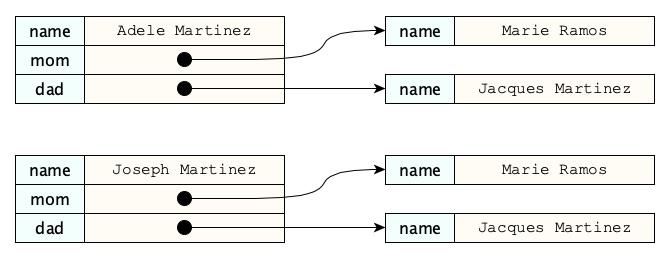
This picture says: Adele and Joseph are two people that happen to have completely different parents that just happen to have the same names. You see this all the time in real life. Just google "Joseph Martinez" and yeah, there are a lot of people with that name.
When you compare two Person objects with the is, it is the object identity that is being compared, not the values of the attributes.
This is a good thing!The idea that objects have an identity distinct from the values of their attributes may at first feel like a deep philosophical concept, striking at the core of being and individuality and behavior, and therefore a complex topic in epistemology and computer science. But it can be learned quickly with practice, and by relating the idea to examples in world such as “different people that happen to have the same name” (and even yes, the same birthday and city of residence). It can happen.
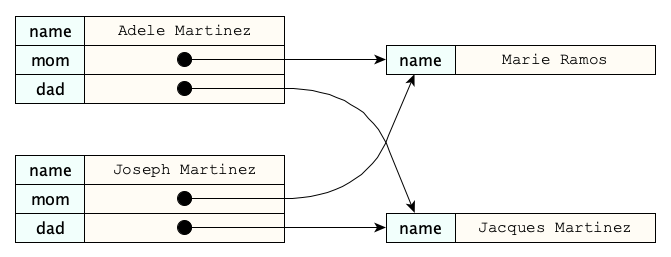
To make real siblings we only want four people here. This is why variables are absolutely essential in this case. Objects are only created when you say Person(...). Replace the code above with:
p3 = Person("Marie Ramos")
p4 = Person("Jacques Martinez")
p1 = Person("Adele Martinez", mom=p3, dad=p4)
p2 = Person("Joseph Martinez", mom=p3, dad=p4)
print(p1.is_sibling_of(p2))
Now because we invoke the Person construction only four times, not six, we have the desired state of the world:
More operations
Now let’s write some useful methods. Add these to your class (making sure they are properly indented so they live inside the class):
    def is_parent_of(self, other):
        """Return if this person is a parent of the other person."""
        return other is not None and (other.mom is self or other.dad is self)

    def is_child_of(self, other):
        """Return if this person is a child of the other person."""
        return other.is_parent_of(self)

    def is_grandparent_of(self, other):
        """Return if this person is a grandparent of another person."""
        return other is not None and (
            (other.mom is not None and self.is_parent_of(other.mom)) or
            (other.dad is not None and self.is_parent_of(other.dad)))
Try out a few.
Finally, we’ll go over this recursive bad boy in class:
    def print_family_tree(self, prefix="", level=0):
        """Print the family tree starting from this person."""
        indent = "    " * level
        print(f"{prefix}{self.name} {self.born or '?'}-{self.died or '?'}")
        if self.mom:
            self.mom.print_family_tree(f"  {indent}mom: ", level + 1)
        if self.dad:
            self.dad.print_family_tree(f"  {indent}dad: ", level + 1)
That’s it. More to follow in the challenges.
Don’t forget to add, commit, and push...and to write a great README.
There’s quite a bit going on with classesThat’s why both (1) keeping up with your readings, and (2) sustained practice, are so important. Keep up your momentum!
Dictionaries vs. Classes
In earlier labs we visited dictionaries. Why, you may, ask, did we not use dictionaries to represent people? It could have worked, but it would have been the wrong way to model the world. Dictionaries are intended to show a single property across many objects; classes are intended to represent a single entity with multiple properties. Here’s an academic-style comparison of these two approaches.
| Dictionaries | Classes |
|---|---|
Has type dict | Has a new type, with whatever name you give it |
Access values with p["name"] | Access values with p.name |
| Items are called key-value pairs | Items are called attributes, and can be properties or methods |
Can be created with {} or dict() | Created with class and __init__() |
| Often intended to represent mappings for multiple entities, such as from countries to capitals | Intended to describe the properties of a single entity |
There is much more to all of this, but this lab is not part of a programming linguistics or software engineering course, so this is quite enough for now. Still, these points are extremely important to know, even for beginners. While you won’t have to code any of this up for the rest of this lab, you’ll see this topic on an upcoming exam, so make sure to work on the recall questions at the end of the lab.
What is is?
We’ve seen how the is operator checks whether two expressions are the exact same object. As a refresher:
p = Person("Alice")
q = Person("Alice")
r = p

p is q  # False, because p and q are different objects
r is p  # True, because r and p are the same object
Now you might ask, could we have used == instead of is? Well, here’s the thing about ==. It means whatever the class author makes it mean! If the class author defines the special method __eq__, then == will call that method. So you can never really be sure what == does, unless you can see the source code for the class and check for a custom __eq__. Many of the built-in Python classes, like list, dict, and even int, have __eq__ methods defined on them. That’s why they work.
Let’s experiment in the Python shell for the rest of this lab to see what this all means. Begin by creating two distinct list objects. Lists are created whenever you use [ and ]. Give them the same elements. Try with both == and is.
>>> a = [10, 20, 30]
>>> b = [10, 20, 30]
>>> a is b
False
>>> a == b
True
The creators of the list class made __eq__ return True if and only if the two lists had the same lengths and all their corresponding elements were equal. Don’t believe it? Try this:
>>> [1, 2].__eq__([1, 2])
True
>>> [1, 2].__eq__([1, 3])
False
They did a similar thing for dictionaries. So if you did happen to use dictionaries for people and used ==, you could compare two people like this:
>>> p = {"name": "Alice", "age": 30}
>>> q = {"name": "Alice", "age": 30}
>>> p == q
True
>>> p is q
False
This is a major cringe. I’m sure those two Alices would be offended if you called them the same person.
Advice: Use classes for custom types, and in general, prefer is to ==.
Yes, we said “in general” because there are some cases in which == is the right choice. We’ll see such cases in future labs.
In Python, everything is an object of some class
Feel free to skip this section. But if you are interested in something behind the scenes, read on!
Here is something pretty interesting. Using the Python shell, ask for the type of some values:
>>> type(8)
<class 'int'>
>>> type("Hello")
<class 'str'>
>>> type([1, 2, 3])
<class 'list'>
>>> type({"name": "Alice", "age": 30})
<class 'dict'>
They are all classes! Now remember how we used == before, and we said that all that did was invoke the __eq__ method of the class? That probably works with numbers and strings, too, right?
>>> 8 .__eq__(8)
True
>>> "Hello".__eq__("Hello")
True
>>> 2 .__eq__(3)
False
__add__ and __gt__. What do you think they mean?
Challenges
Now it’s your turn. Here are some ideas for you to extend the activities above:
- Add a handful of additional family members to the family above. You can get the data, as these are all public records, available, among other places, at Wiktree. There are records for this family going back into the 1600s. Just add a few people for practice.
- Write a method to return a list of all of the known grandparents of a person. You should return a list of between zero and four people.
- Write a method to return a list of all of the known siblings of a person.
- Write a method to determine whether a person is a first cousin of another.
- The code
{self.born or '?'}-{self.died or '?'}was repeated in both the__str__andprint_family_treemethods. Factor it out into another method calledlife_span_textand rewrite__str__andprint_family_treeto call this new method. - Create new methods of your choice. Be creative!
- Make people for yourself and your own family.
- Separate the program into different files, so that people are defined in one file and the class and its methods in another.
- Use a coding agent to write a function that accepts a person and outputs a graphical family tree. Let the agent suggest the best format. Ask it to choose between HTML, SVG, or another format it has in mind. Get your data to be
6, 7 or8 levels deep.
Further Study
In addition to getting practice with dictionaries, we learned about classes for the first time. Please go deeper into classes at these sources:
- In Think Python, 2nd edition, read Chapters 15–17.
- In the Python Tutorial, read Sections 9–9.4. As always, remember this document goes into some details beyond which are common for beginning programmers, so focus primarily on the Think Python reading assignments.
Summary
We’ve covered:
- How to define a class
- The special
__init__method - The special
__str__method - What references are
- How variables allow for sharing instead of copying
- Dictionaries vs. classes
- The
isoperator - The special
__eq__method
Recall Practice
Here are some questions useful for your spaced repetition learning. Many of the answers are not found on this page. Some will have popped up in lecture. Others will require you to do your own research.
- What is a class? A class is a new type that we can define in Python, which allows us to create objects with specific attributes and methods.
- What is the purpose of the
__init__method in a class?The__init__method is a special method that initializes the attributes of a new object when it is created. - What is the purpose of the
__str__method in a class?It is a special method that returns a human-readable string for an object. - What is the difference between a method and a function in Python? A method is a function that is defined inside a class and operates on instances of that class, while a function is defined outside of any class and can operate on any data.
- What is the
selfparameter in a method?Theselfparameter refers to the instance of the class on which the method is called. You never pass it directly as an argument. - Assuming we represented people with dictionaries with
name,mom, anddadproperties, how might we access the name of personp’s maternal grandfather (assuming it was known)?p["mom"]["dad"]["name"] - If a dictionary representing a person does not have a known mother, what does the expression
p["mom"]evaluate to?Nothing, it raises aKeyError. - What is the difference between
==andis?==checks for equality, whileischecks for identity (whether they are the same exact object). - If we ran these two statements:
    p = {"name": "Alice"}
    q = {"name": "Alice"}
what would the expressionsp == qandp is qevaluate to, and why?p == qevaluates toTrue, whilep is qevaluates toFalse. This is becausepandqare two different dictionary objects that happen to have the same content. - What happens when you define a dictionary with
{and}in Python?Python creates a completely new dictionary object. - How would we define
pandqto both be dictionaries with a single item with key"name"and value"Alice", but so thatp is qevaluates toTrue?Like this:p = {"name": "Alice"} q = p - What does the
__eq__method allow?To define custom behavior for the equality operator==.