Fractal Forest LAB12
Welcome
Galileo Galilei was said to have said: “[The universe] stands continually open to our gaze, but it cannot be understood unless one first learns to comprehend the language in which it is written. It is written in the language of mathematics, and its characters are triangles, circles, and other geometric figures, without which it is humanly impossible to understand a single word of it; without these, one is wandering about in a dark labyrinth.”
Galileo was only partially right—something about this quote is off. If you ever see a rectangle, square, triangle, or even a straight line in nature, it was probably machine-made or human-made. Benoit Mandelbrot said it better: “Clouds are not spheres, mountains are not cones, coastlines are not circles, and bark is not smooth, nor does lightning travel in a straight line.”
The shapes of nature have evolved to be efficient. We model them with fractals.
In this lab, we’ll gain an initial understanding of fractal shapes by generating pictures of trees, using a tree-drawing library.
What We Will Learn
Recursion in images Using an image library RGB Colors
Activity
Make sure you are in your virtual environment, because we are going to install a library that can draw trees:
pip install Tree
Let’s write a program to use this library. It’ll be basically the example program straight from the library’s PyPi page. So mkdir a lab12 folder and cd into it. Create the file tree.py with the following code:
from math import radians
from Tree.core import Tree
from PIL import Image

tree = Tree((0, 0, 0, -200), [(0.75, radians(-30)), (0.75, radians(30))])
tree.grow(10)
tree.move_in_rectangle()
image = Image.new("RGB", tree.get_size(), (200, 240, 250))
tree.draw_on(image, (50, 40, 0, 180, 130, 30), (30, 160, 30), 25)
image.show()

Run the program with the command python tree.py. You should see a window pop up with a tree in it. If you don’t see anything, make sure you are still in the virtual environment and that you have installed the Tree library. After admiring your work, close the window.
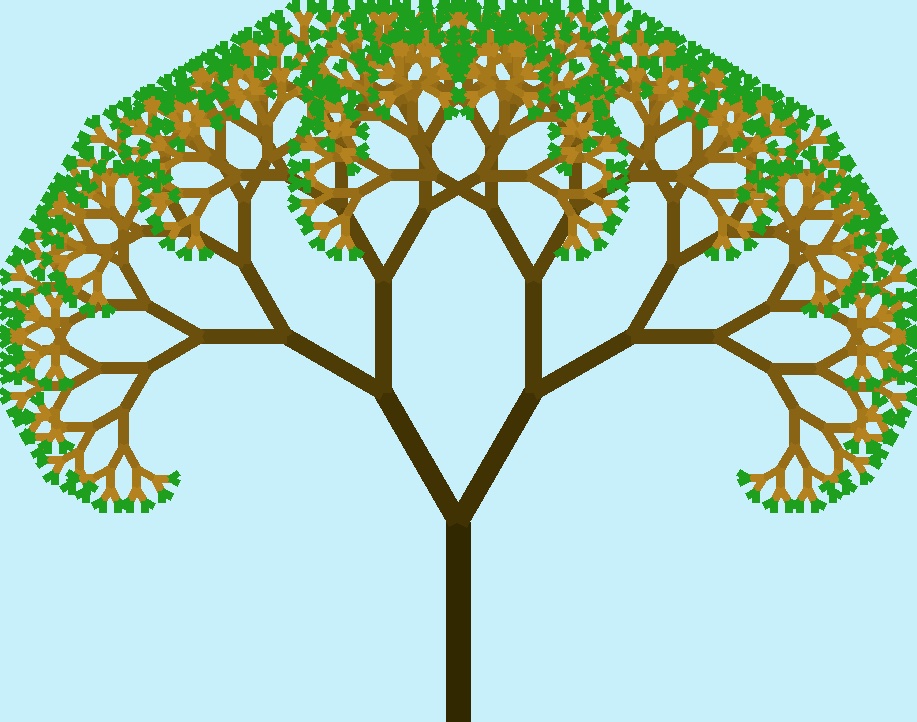
What even is going on with that code? What even do all those numbers mean? Such excellent questions!
It turns out this tree drawing library actually has complete documentation online, explaining the Tree class, its initializers, and its other methods. But still, what do all those numbers mean? Even if you memorized the documentation, it would be really, really hard to make sense of that code. We should be ethical programmers and try to make our code more readable. Let’s add some variables and use keyword arguments to improve the code above:
from math import radians
from Tree.core import Tree
from PIL import Image

background_color = (200, 240, 250)
leaf_color = (30, 160, 30)
trunk_width = 30
base_trunk_color = (50, 40, 0)
small_branch_color = (180, 130, 30)
branch_gradient = (*base_trunk_color, *small_branch_color)

trunk_length = 200
first_branch_line = (0, 0, 0, -trunk_length)
scales_and_angles = [(0.75, radians(-30)), (0.75, radians(30))]
age = 10

tree = Tree(pos=first_branch_line, branches=scales_and_angles)
tree.grow(age)
tree.move_in_rectangle()
image = Image.new("RGB", tree.get_size(), background_color)
tree.draw_on(image, branch_gradient, leaf_color, trunk_width)
image.show()
There are so many parameters to vary here, aren’t there? Experiment with age first, noting that:
- At
age=0andage=1the program crashes. - At
age=2you get a tree with a trunk and two branches, and each branch has two leaves. - At
age=3you get a tree with a trunk and two branches, and each branch is...a tree of age 2. - At
age=4you get a tree with a trunk and two branches, and each branch is...a tree of age 3. - At
age=5you get a tree with a trunk and two branches, and each branch is...a tree of age 4.
You see what is going on here, right?
Recursion.
Where exactly is the recursion coded up?You don’t see the recursive calls because they are buried inside the library somewhere, but they are there.
Do you think you can find the code? (Hint: there’s probably a link to the GitHub repo for this somewhere in the documentation. Or use the VSCode File Explorer to dive deep into the env folder. 😮)
Walking through successive values of age from 2, 3, 4, and so on also highlights the way color gradients are interpreted by library. Play around with those a bit, as well as with the trunk width and trunk height.
But wait...how do we understand colors? Why is each color a tuple of three numbers? It turns out this is no accident. Try out this little widget to explore how colors are made from the three primary colors, red, blue, and green:
R 0
G 0
B 0
The R-G-B color model works well, as it mimics the human visual system. We all have three cones in our eyes, one sensitive to red, one to green, and one to blue. Mixing them together allows us to perceive a wide range of colors.
You can also search for an online color tutorial to learn more.
Next, work on varying the branch data, in the scales_and_angles list. The original code has only two branches, each 75% the length of the previous branch, and each angled 30 degrees off the previous branch. You should experiment with different numbers of branches, different scaling factors, and different angles. Note that you can, and are encouraged to, make the branches have different scale factors and angles from each other—that makes the trees more realistic because they’re not so symmetric.
As you experiment, make a note of your favorite tree settings and slack them to everyone else on the private class channel. Or, upload a screenshot of a nice tree and ask classmates to guess the parameters.
[(0.5, radians(-30)),(0.4, radians(40))] with an age of 10 and trunk width of 25 to be kind of Joshua tree like. What do you think? And interestingly, adding the tuple (0.5, radians(2)) to that list, seemed to make a massive change, with a big leaf canopy. What do you think is going on there?
Don’t forget to add, commit, and push. And write a nice README.md describing what you’ve done.
Challenges
Now it’s your turn. Here are some ideas for you to extend the activities above:
- Explain the values of the branch parameters to a friend.
- The documentation for this library says there is a
sigmaparameter for theTreeinitializer but does not say what it does. Play around with that, too. What do you think it means? Are there comments in the source code that indicate its purpose? (Hint: it has something to do with adding some “randomization” to the tree, but (1) how exactly, (2) why would we use it, and (3) what are some decent values for this parameter?) - (🌶🌶) Read the docs to see if there is a way to make an image with multiple trees. If you can find a way, either by reading the docs or in spite of reading the docs, make a nice image of a forest with a variety of different trees.
Further Study
You might want to take a peek at this article in which the author explains the construction of a fractal tree. It’s not crucial to understand what’s going on in detail, but reading the article might give you an intuition of the big picture.
If you would like to dig deeper into exactly what is going on with virtual environments (internal workings, why we need them, and some of the many additional features you get with pip and related tools), there are many online resources that should be easy to find. The Python Tutorial covers them in Section 12 if you are interested.
Summary
We’ve covered:
- That the shapes of nature are represented with fractals
- How to create and enter a virtual environment
pip install- Installing and using the Tree library from PyPI
- The RGB Color system
Recall Practice
Here are some questions useful for your spaced repetition learning. Many of the answers are not found on this page. Some will have popped up in lecture. Others will require you to do your own research.
- What did Galileo Galilei seem to get wrong about the language of nature? He believed that the characters of this language were “triangles, circles, and other geometric figures” but such simple shapes rarely appear in nature.
- What is Mandelbrot’s famous quote? “Clouds are not spheres, mountains are not cones, coastlines are not circles, and bark is not smooth, nor does lightning travel in a straight line.”
- What exactly is a fractal? A geometric shape made up of reduced-scale copies of itself, i.e., and infinitely self-similar shape. These mathematical constructs are useful in approximating structures in nature.
- What is the purpose of the Tree library? It generates and draws pretty fractal trees in Python.
- What does the
ageparameter control in the tree drawing code?How many levels of branches the tree will have, with higher values resulting in more complex trees. - What is the significance of the
scales_and_anglesparameter in theTreeclass?It defines the scaling factor and angle for each branch of the tree, allowing for variation in branch size and direction. - How can you change the color of a tree’s leaves and trunk? By modifying the RGB values in the
leaf_color,base_trunk_color, andsmall_branch_colorvariables. - What is the purpose of the
move_in_rectanglemethod in theTreeclass?It adjusts the position of the tree so that it fits within a specified rectangle, ensuring that the tree is drawn within the bounds of the image. - How do you display the generated tree image? Call the
image.show()method from the PIL library. - What is the purpose of the
branch_gradientvariable in the tree drawing code?It defines the color gradient for the branches, transitioning colors from the trunk to the smaller branches. - Give the RGB values for (fully saturated) red, yellow, green, cyan, blue, magenta, white, and black. Red: (255, 0, 0), Yellow: (255, 255, 0), Green: (0, 255, 0), Cyan: (0, 255, 255), Blue: (0, 0, 255), Magenta: (255, 0, 255), White: (255, 255, 255), Black: (0, 0, 0).
- How do you make a saturated orange color in RGB? Something like (255, 128, 0). Red should be a 255, blue at 0, and green somewhere in the 80-170 range. Too much green gives yellow, and not enough gives red.
- How do you make pink in RGB? Full red at 255, and green and blue both around 200.