Triangle Art LAB1

Welcome
Programming, and computer science in general, is about imagination and creativity.
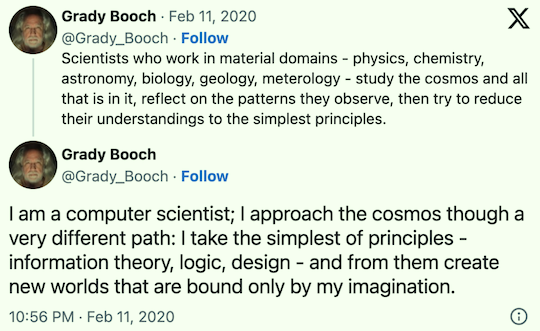
Creativity requires constraints. Today we will create beautiful triangles using nothing more than individual characters.
What We Will Learn
Basic Python Programming Strings Printing String repetition Variables For-loops Lists Ranges Function definitions Parameters Function calls Arguments Labeled arguments
Activity
Our class begins not with theory and not with history, but with programming. Writing code gives you an understanding of software that goes beyond just reading it.
Go to OneCompiler and select Python.
Type in your first program:
print("*")

Run it!
Vocabulary time: text enclosed in quotation marks is called a string.
Now let’s make a triangle. Change the program to look like this:
print("*")
print("**")
print("***")
print("****")
print("*****")
print("******")
print("*******")
print("********")
print("*********")
print("**********")
Run it. Note that it worked, but it was tedious to type. It’s kind of easy to type something incorrectly. Here is another way:
print("*" * 1)
print("*" * 2)
print("*" * 3)
print("*" * 4)
print("*" * 5)
print("*" * 6)
print("*" * 7)
print("*" * 8)
print("*" * 9)
print("*" * 10)
Woah, we multiplied a string by an integer—pretty cool! Run the new program to make sure it works. Spoiler: it does, but it is unsatisfying. How would you change the code to print bullets instead of asterisks? You would have to change 10 different "*" strings to "•". That doesn’t feel fair. So change the program to this shorter version that mentions the character to print only once:
for count in [1, 2, 3, 4, 5, 6, 7, 8, 9, 10]:
    print("*" * count)
The word count there is a variable. A variable is a named thing that holds a value, and it can hold different values as the program runs. The code above us just a nice way of writing:
count = 1
print("*" * count)
count = 2
print("*" * count)
count = 3
print("*" * count)
count = 4
print("*" * count)
count = 5
print("*" * count)
count = 6
print("*" * count)
count = 7
print("*" * count)
count = 8
print("*" * count)
count = 9
print("*" * count)
count = 10
print("*" * count)
In the cool concise program, the code print("*" * count) appears FOR each value of count from 1 through 10. Congratulations, you just learned Python’s for loop. By the way, “loop” is the programming word for doing something repeatedly.
The for-loop not only made our code shorter, but importantly, it made it much easier to change. Changing the program to print bullets is now easy. You just change one character in the whole program. Try it!
for count in [1, 2, 3, 4, 5, 6, 7, 8, 9, 10]:
    print("•" * count)
Run to make sure that works too.
There is still a problem: the code does not scale well. How would you make the program print a triangle that was 1,000 or 1,000,000 lines long? Yikes. But wait, Python can help us:
for count in range(1, 11):
    print("•" * count)
Yes, that 11 is no accident. Python ranges are inclusive at the start and exclusive at the end. To get 1, 2, 3, 4, 5, 6, 7, 8, 9, 10, it’s indeed range(1, 11).
Now let’s make two triangles, like the flag of Nepal (🇳🇵):
for count in range(1, 11):
    print("•" * count)
for count in range(1, 11):
    print("•" * count)
That worked, but it feels like there’s something we can do better. There are four lines of code, but the program is only really doing two things. It is making two triangles. And get this: the word triangle never appears in the program! Let’s fix it.
def print_triangle():
    for count in range(1, 11):
        print("•" * count)

print_triangle()
print_triangle()
The way we read this is: (1) we first define what it means to print a triangle, namely print 10 lines of bullets, one bullet on the first line to ten on the last; (2) we then print a triangle; (3) we finally print another triangle.
Celebrate! You’ve experienced something powerful.
Now learn you some vocab: print_triangle is called a function. The function is defined on the first line of the program. The last two lines are function calls. Nothing visible happens when you define a function. Calling is where things happen. Notice how functions allow us to not only express exactly what we are doing, but they enable reusable code. Define it once, call it many times.
Now it’s time for the program to glow up. It is about to achieve flexibility. Rewrite it as follows:
def print_triangle(lines):
    for count in range(1, lines + 1):
        print("•" * count)

print_triangle(8)
print_triangle(13)
print_triangle(5)
You’ve added a parameter to the function definition. And by the way, when we call a function, the thing we pass to the parameter is called and argument.
Vocabulary Overload?Don’t panic. You can learn all these terms. The more you program the more the words become internalized. You can always periodically quiz yourself if you want to ramp up more quickly.
Parameterization is powerful. What do you think the following program does? Read the code first and try to predict its behavior. Then type it in and run it and see if you were right.
def print_triangle(character, lines):
    for count in range(1, lines + 1):
        print(character * count)

print_triangle("@", 8)
print_triangle("&", 13)
print_triangle("o", 5)
One last thing: Parameters are powerful but if you have too many of them, it sometimes gets hard to know what is going on in the call. You can usually label the arguments with your parameter names. It’s done like this:
def print_triangle(character, lines):
    for count in range(1, lines + 1):
        print(character * count)

print_triangle(character="@", lines=8)
print_triangle(character="&", lines=13)
print_triangle(character="o", lines=5)
Challenges
Now it’s your turn. Here are some ideas for you to extend the activities above:
- Print a triangle of size 1, followed by a triangle of size 2, followed by a triangle of size 3, and so on, up to size 20. (Hint: call
print_trianglein a loop. Did you know that was the best way?) - Make a triangle in which each line has two characters more than the previous one. You can do with by giving a third argument to
range. Like this:range(1, lines+1, 2). - The triangles we’ve been making have the ◣ shape. Make a function to draw an upside-down triangle, that is, with the ◤ shape. You can do this by setting the third argument of
rangeto -1. But how should you set the other two arguments? For this, you will need to experiment: after all, this is a laboratory exercise! You can also check out documentation or perform a web search. After you get things working to your taste, ask an AI to explain the code to you. - (🌶) Make a function to make a triangle with the ▲ shape. To do this, you’ll need to add a line of code to print some spaces just before the line in which you print the line of visible characters. But how many? This will require some thinking and experimenting. Do NOT offload this thinking to an agent. There is benefit in the struggle to explore, try, and work your problem solving brain muscles. We’ll try this out during class.
- (🌶🌶🌶) Instead of a “filled-in” triangle, make a function that produces an outlined triangle, something like:
    •
    ••
    • •
    •  •
    •   •
    •    •
    •     •
    •      •
    •••••••••
If you get really stuck, ask an agent to unstick you. After you have completed this challenge, ask an agent to write its own version, and compare the two solutions.
Further Study
Hopefully this first lab was interesting and has whet your appetite for programming, computing, and even computer science. Here are some resources providing an overview of these topics:
- I have notes on the field of computing.
- I have notes on the field of computer science.
- As you learn to program, you might be interested in what learning programming entails.
Summary
We’ve covered:
- How to run a Python program at OneCompiler
- Printing text
- String repetition
- What variables are
- Loops
- Avoiding repetition in code, making it easier to change
- Using functions to make code more readable
- Defining and calling functions
- Parameters and arguments
- Argument labeling
Recall Practice
Here are some questions useful for your spaced repetition learning. Many of the answers are not found on this page. Some will have popped up in lecture. Others will require you to do your own research.
- How does Grady Booch distinguish sciences in the material domains from computer science? In the physical and life sciences we reduce observations of the cosmos to simple principles, while computer science takes simple principles to and build from them imagined worlds.
- What does the Python program to print the message
Hellolook like?print("Hello") - What are the values in
range(2, 8)?2, 3, 4, 5, 6, 7 - What are the values in
range(10, 30, 3)?10, 13, 16, 19, 22, 25, 28 - What are the values in
range(30, 10, -3)?30, 27, 24, 21, 18, 15, 12 - What are the values in
range(10, 30, -3)?This range is empty. - What does the program to print 100
Hellomessages, one per line, look like, using a for-loop and a range?for count in range(1, 101): print("Hello") - In Python, what is
"ho" * 3?"hohoho" - What is a variable? A variable is a named thing that stores a value, and it can take on different values as the program runs.
- What is a function used for? To give a nice name to an action or actions to make our code much more readable, and simpler too, especially if we call the function multiple times.
- How do we make our functions flexible? By adding parameters to the function definition.
- What is the difference between a parameter and an argument? A parameter is a variable in the function definition, while an argument is the value we pass to the parameter when we call the function.
- Why is it a good idea, sometimes, to label arguments? It makes it easier to read the code and understand what is going on. It also allows us to change the order of the arguments.