Welcome To Programming
Your First Program
What are your chances of winning the lottery?
Suppose a lottery game picks 6 distinct numbers from the set 1..53. What are the odds that your 6 numbers come up?
In a separate browser window, navigate to javascript.cs.lmu.edu/runner and enter the following code into the text box and hit the Run button.
var possibilities = 53 * 52 * 51 * 50 * 49 * 48;
alert("The odds are " + possibilities + " to 1.");
If it works, a window should have popped up with the message "The odds are 16529385600 to 1." If you
are having a hard time reading that number, the JavaScript language has this nice toLocaleString
operator you can apply to numbers. Edit your program so it reads like this:
var possibilities = 53 * 52 * 51 * 50 * 49 * 48;
alert("The odds are " + possibilities.toLocaleString() + " to 1.");
and run it again. You should see a number nicely formatted according to the locale that your computer is configured for.
We can specify the locale directly. Try this:
var possibilities = 53 * 52 * 51 * 50 * 49 * 48;
alert("The odds are " + possibilities.toLocaleString("de-DE") + " to 1.");
ar-EG. Also try en-US.
Where Can I Learn to Program?
There are many tutorials, walkthroughs, academies, and online universities out on the web that will teach you the basics of programming. You can try:
- Codecademy
- Code Avengers
- LearnStreet
- Khan Academy Computer Science
- Some (certainly not all) of the sites returned by a search for "learn programming online"
Khan Academy Computer Science is a pretty good place to start.
Getting Started with Khan Academy Computer Science
Go to Khan Acedemy's Computer Science home page. Then:
- Watch the introductory video.
- Go through the first few set of tutorials in order. As of the day the site launched, these are as follows:
- As you work through the tutorials, don't forget to experiment with what you learn in each session.
- Try out some projects of your own. By all means start with an existing project and modify it. More on this below....
Building Your Own Projects at Khan Academy
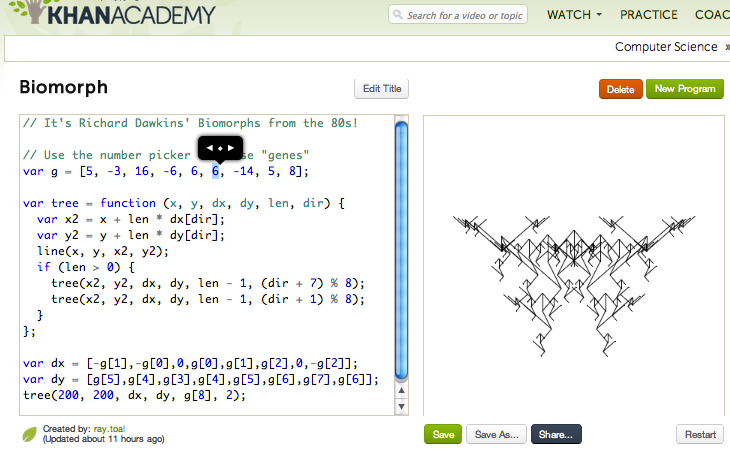
Khan Academy provides a nice little environment using the Ace Editor and a Code Canvas. You write code in the JavaScript programming language (with Processing.js to generate the graphics) and the canvas is updated as you write your code! The editor features nice little gadgets (e.g., the number picker and the color picker) to vary program elements via gestures for instant feedback and to encourage experimentation.
Starting with an existing program
There are dozens of scripts for you to use as a starting point. If you want to start simply, choose one of the programs from the Drawing group, for example Winston or Snowman. Use the number picker in the editor to play around and see what each of the values are doing. Change the program into something you like better, and save it or share it (using the Save As... or Share buttons under the canvas).
Writing from scratch
Feeling good about yourself now? Try the New Program button to the upper right of the code canvas. Remember what you've learned:
- The basic drawing functions are
ellipse,rect,line,triangle,point, andbezier. - Use
stroketo set the stroke color andfillto set the fill color for subsequent drawing; turn them off withnoStrokeandnoFill. - Use
translate,rotate, andscaleto affect subsequent drawing; turn these "off" withresetMatrix. - For animation, draw each "frame" in the
drawfunction. The properties you want to animate will have to be defined in variables outside the function, then assigned new values within the function. You can "animate" literally anything, not just sizes, positions, and colors. Be creative!
Here's something I made:
Sharing
The programming culture is one of sharing. Programmers are generally flattered when others use their code and extend it in new ways.
If you've made a modification to an existing program, share it. Remember to give attribution to the original author. Fortunately, Khan Academy makes this easy. If you've started with someone else's code and saved a "derived work" into your own "My Programs" bucket, then your program's page will show, to the lower right of the code, a link to the original program.
Is this the Best Way to Learn Programming?
While there's likely no one best way for everyone to learn programming, Khan Academy Computer Science has some fans, but it's not completely without fault.
Please read (and interact with) this excellent essay by Bret Victor.