Memory Management
Why Care?
Aren’t programming languages supposed to be human-friendly, high-level constructions that abstract away all those nasty details of the underlying machine, like memory and registers?
The answer is: not always.
Why is that a problem that some languages don’t abstract away enough?
- 90% of reported security incidents result from exploits against defects in the design or code of software
- Microsoft says 70% of all security bugs are memory safety issues
But if a language does sufficiently abstract away enough to prevent memory safety vulnerabilities, do we still need to understand the basics of memory management?
Yes! Even if your language is super super super super super high-level, it‘s still running on a machine, and machine details do leak into the high-level language in subtle ways—if not in ways that affect correctness or security, then for sure in ways that affect performance. These details also leak into error messages, so knowledge of memory management management will help you debug inevitable problems.
Let’s start the tour with a look at modern machines.
Modern Machine Architecture
There are no laws that dictate how exactly a machine must be constructed to run a program. As long as the machine executes the program according to the language definition, all is well.
That said, almost every machine today carries out execution on a machine roughly architected like this:
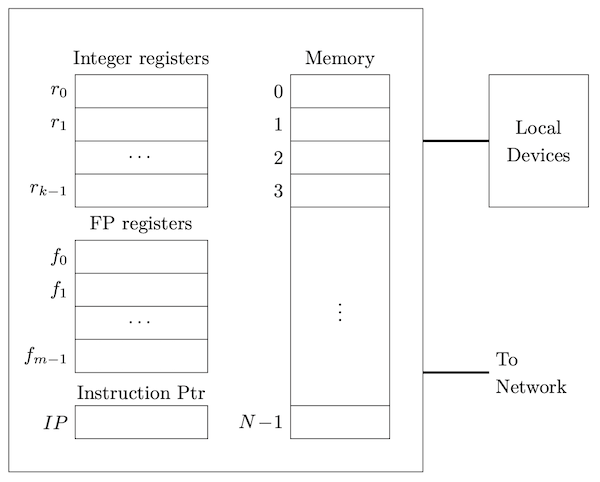
The registers handle arithmetic and logic. Machine instructions carry out these operations as well as shuttle data between registers or between registers and memory, or in and out of the various ports connecting the processing units to external devices and the network. Modern machines have multiple processing units, called cores, that typically share memory and ports.
Typically, memory is simply an array of bytes. There may be different levels of caches, and different running processes can be mapped to different regions of the real memory, but each running process has a view of memory as an array of bytes. The indices of this memory array are called addresses.
Mapping Variables to Memory
Let’s see how variables are typically placed in memory. We say variables since literals are generally compiled right into the machine code, though they could in theory also be allocated if needed. We’ll start simply.
Basic Values
Generally, fixed-size values are laid out at successive addresses, though alignment concerns often come into play. Here’s an example in C. C is fascinating because it is one of the few languages where you can actually obtain the address of a variable. All you need is the address operator, &:
#include <stdio.h>

int square(int x) {
    return x * x;
}

double global = 6.28;

int main() {
    long z = 892300123888897;
    _Bool b;
    short s;
    double _Complex c;
    double x;
    float y = 2.99f;
    _Bool w;
    printf("square is at address %p\n", &square);
    printf("main is at address %p\n", &main);
    printf("global is at address %p\n", &global);
    printf("z is at address %p\n", &z);
    printf("b is at address %p\n", &b);
    printf("s is at address %p\n", &s);
    printf("c is at address %p\n", &c);
    printf("x is at address %p\n", &x);
    printf("y is at address %p\n", &y);
    printf("w is at address %p\n", &w);
    return 0;
}

One run of this program produced:
square is at address 0x10084fd90
main is at address 0x10084fda0
global is at address 0x100854010
z is at address 0x7ffeef3b3a20
b is at address 0x7ffeef3b3a1f
s is at address 0x7ffeef3b3a1c
c is at address 0x7ffeef3b3a08
x is at address 0x7ffeef3b3a00
y is at address 0x7ffeef3b39fc
w is at address 0x7ffeef3b39fb
Here we can see that global variables and executable code are in a very different region of memory than where the local variables go. (More about this later.) The locals in this example are allocated like this:
             ┌─────┬─────┬─────┬─────┬─────┬─────┬─────┬─────┐
7ffeef3b39f8 │ ▩▩▩▩▩▩▩▩▩▩▩▩▩▩▩ │  w  │           y           │
             ├─────────────────┴─────┴───────────────────────┤
7ffeef3b3a00 │                       x                       │
             ├───────────────────────────────────────────────┤
7ffeef3b3a08 │                                               │
             ├                       c                       ┤
7ffeef3b3a10 │                                               │
             ├───────────────────────┬───────────┬─────┬─────┤
7ffeef3b3a18 │ ▩▩▩▩▩▩▩▩▩▩▩▩▩▩▩▩▩▩▩▩▩ │     s     │ ▩▩▩ │  b  │
             ├───────────────────────┴───────────┴─────┴─────┤
7ffeef3b3a20 │                       z                       │
             └─────┴─────┴─────┴─────┴─────┴─────┴─────┴─────┘
7ffeef3b3a28
On my machine, the local variables were allocated in the order they were declared, from high addresses down to low addresses. Sometimes you will see memory diagrams with high addresses above the lower addresses (which might actually be more common, but get adept reading it both ways.)
Note the padding. Memory alignment is a big deal; you’ll learn why in your hardware classes (or via a simple web search!)
Arrays, Structs, and Tuples
In languages such as C, Go, Rust, and Swift, you will almost always find arrays, structs, and tuples handled no differently than the basic numbers, chars, and booleans above. These values always have a fixed, unchanging, size, so they just fit right in place, respecting any padding conventions:
int main() {
    _Bool b;
    int a[] = {1, 2, 3};
    struct {
        int x;
        int y;
    } s;
    // ...
}
Printing the addresses as in the previous example yielded:
b is at address 0x16db4f253
a is at address 0x16db4f258
a[0] is at address 0x16db4f258
a[1] is at address 0x16db4f25c
a[2] is at address 0x16db4f260
s is at address 0x16db4f248
s.x is at address 0x16db4f248
s.y is at address 0x16db4f24c
          ┌─────┬─────┬─────┬─────┬─────┬─────┬─────┬─────┐
16db4f248 │          s.x          │          s.y          │
          ├─────────────────┬─────┼───────────────────────┤
16db4f250 │ ▩▩▩▩▩▩▩▩▩▩▩▩▩▩▩ │  b  │ ▩▩▩▩▩▩▩▩▩▩▩▩▩▩▩▩▩▩▩▩▩ │
          ├─────────────────┴─────┼───────────────────────┤
16db4f258 │         a[0]          │         a[1]          │
          ├───────────────────────┼───────────────────────┤
16db4f260 │         a[2]          | ▩▩▩▩▩▩▩▩▩▩▩▩▩▩▩▩▩▩▩▩▩ │
          └─────┴─────┴─────┴─────┴─────┴─────┴─────┴─────┘
Notice that we mentioned arrays having fixed-size. That’s right. Usually when we say array we mean an object of a fixed number of elements. If you have an array can can grow and shrink, you should use an alternate term like vector or array-list. Values whose size is not fixed, or known, say, only at run time, are generally handled via references.
References (Pointers)
It’s important to understand references! Fortunately, it is not hard to do so. The big idea is just this: The value of a reference is the address of its referent.
Here’s an example:
long x = 5;
long* p = &x;
Suppose x was placed at memory at address 238 and p was placed at memory at address 3a0. We would see:
      ┌───────────────────┐
238   │         5         │  (x, a.k.a. *p)
      ├───────────────────┤
      │         .         │
      │         .         │
      │         .         │
      ├───────────────────┤
3a0   │        238        │  (p, a.k.a. &x)
      └───────────────────┘
We’ll compare this memory snapshot with the traditional ”boxes and arrows” diagram of a pointer to an integer.
Okay so that wasn’t bad at all. But what if...no...wait...what if...we had...that horrible...null reference 😱 😱 😱 😱 😱 😱 😱 😱 😱 😱? How the heck is that even represented in memory? Did you say we can store a zero? DID YOU THINK THAT WAS NATURAL AND EVEN...NORMAL? Why? Because you were used to it?
Null references are not only evil, but annoying!If you have null references, or null pointers, then you will need to choose some value to represent null-ness, or you will need an extra bit or separate memory word to indicate that the reference doesn’t refer to anything. The former takes up less memory, of course, but it does mean that whatever address is your special indicator for
null, that address is off-limits to referents. Ugh.
But hang on, remember how in Python everything is implicitly a reference? And Python has a value called None? Isn’t this a null reference? ABSOLUTELY NOT. So what is it?
We will reveal what None is, and to what extent this value does or does not contribute to the Billion Dollar Mistake.
References? Pointers? What is the Difference?
Good question.
Sometimes you can use the terms interchangeably.
Perhaps the most correct and useful way to distinguish the terms is to say that a reference is a value that refers (opaquely) to another value, while a pointer is a reference represented by an integer address that you can operate of via addition and subtraction to form new pointers.
int main() {
    double a[] = {1.0, 2.0, 3.0, 5.0, 8.0, 13.0};
    double* p = &a[1];
    double* q = p + 2;
    printf("q points to %f\n", *q);    // 5.0
}
Pointer Arithmetic
In C, pointers are typed, so pointer addition is automatically scaled by the size of the elements referenced by the pointer.
p and q.
Variable-Length Data
By variable-length data we generally mean a value whose size is not known at compile-time. While extremely flexible, such data cannot be pre-allocated by a compiler and operations on the data cannot take advantage of certain optimizations. There are always trade-offs. The big picture, then, is that the memory mapping is deferred until run-time and any variable “storing” such data will almost always store a reference.
There is one main exception to this rule, and that’s when a local array variable is sized to the value of a parameter (and never changes afterwards).
void f(int n) {
    int a[n];
    // ...
}
This only works because storage for parameters and local variables of a function only come into existence when the function is called, so if at that time we get a value for n, we will know how much memory to allocate.
There are three main kinds of variable-length data that do require references: slices, resizable arrays, and linked structures.
Slices
Slices are a really big deal in modern languages, and you should understand them! Here is what Go By Example says: “An array has a fixed size. A slice, on the other hand, is a dynamically-sized, flexible view into the elements of an array. In practice, slices are much more common than arrays.” Here is a Go example:
func main() {
    primes := [6]int{2, 3, 5, 7, 11, 13}    // an array
    var s []int = primes[1:4]               // a slice
    fmt.Println(s)
}

And Rust has slices too, where they are probably more common that arrays there too. In fact, strings in Rust are...slices!
fn main() {
    let primes = [2, 3, 5, 7, 11, 13];     // an array
    let s = &primes[1..4];                 // a slice (borrowed)
    println!("{:?}", s);
}

Slices are represented in memory with a pointer to the address of the first element and the number of elements in the slice. In Go, there's a third entry, the capacity, holding the number of elements in the underlying array from the first element of the slice to the last element of the array.
We’ll generate pictures for Rust and Go slices.
Getting an intuition for slicesSlices are extremely important for enabling flexibility, while maintaining security, in low-level languages like Go and Rust.
Keep in mind that there is always a fixed-sized underlying array, and a slice is just a view into it.
Resizable Arrays
Do you remember these from your Data Structures class?
Let’s build one!
Linked Structures
You might remember these from a Data Structures class. The “links” provide a way for the structure to grow without the need for a massive reallocation. Each node contains some data and links to its neighbor nodes (e.g., parents, children, successors, predecessors, etc.) The links can be either (1) pointers (or references) to the neighbors, or the neighbors can be optional nodes. Why pointers? To allow for circularity!
There is so much exploration to do here. Let’s riff on the possibilities.
Implicit Referencing and Dereferencing
Sometimes working with pointers and references feel hard because whether a reference is actually present or not is not reflected in the syntax. That is, looking at the code, it’s not obvious whether there’s a reference or not. Some languages refuse to be so coy! A reference always has an explicit operator (such as & or ref), and dereferencing always has an explicit operator (such as * or deref).
Some languages have no reference or dereference operators, meaning all references are implicit, and you have to know the language rules to figure out when they are there are not. Usually the rules are easy enough, but people make mistakes! Here is a sampling of language rules:
| Language | Not Referenced | Referenced |
|---|---|---|
| Lua | number, bool, nil, string | table, function, userdata, thread |
| Python | — | (everything) |
| JavaScript | number, bool, null, undefined, symbol | (everything else) |
| Java | byte, short, int, long, float, double, char, boolean | (everything else) |
| Swift | Structs, Enums, and Tuples | Classes and Functions |
Seriously, some languages store numbers by reference?Well they don’t really have to store references to them if the values are immutable. THINK ABOUT THIS! But they do have to behave as if a reference was present.
Some languages feature implicit referencing and dereferencing. This means that the language will sometimes automatically insert the reference operator when needed, and automatically insert the dereference operator when needed. This can make the code easier to read, since the operators proliferate, but you can no longer look at the code and kow what is going on at a glance. You have to learn the language rules (and they might not be easy).
Rust does this frequently, adding in & and * operators behind the scenes to make things just work. Example:
struct Rectangle {
    width: f64,
    height: f64,
}

impl Rectangle {
    fn new(width: f64, height: f64) -> Self {
        Rectangle { width, height }
    }
    fn area(&self) -> f64 {            // implicit dereferencing
        self.width * self.height       // Did not have to say (*self).width
    }
}

fn main() {
    let r = Rectangle::new(3.0, 4.0);   // implicit referencing
    println!("Area is {}", r.area());   // Did not have to say (&r).area()
}
Memory Regions
As for the memory itself, programs in a typical programming language are compiled into machine code that expects memory to be organized into various sections:
- The (machine) code itself, surprisingly called the text
- Static and global variables known at compile time, called the data
- Variables that are local to functions and procedures, called the stack
- Variables that are dynamically allocated, called the heap
These sections are typically laid out in memory like this:
    ┌─────────────────┐
    │                 │
    │      text       │
    │                 │
    ├─────────────────┤
    │                 │
    │      data       │
    │                 │
    ├─────────────────┤
    │      heap       │
    │        │        │
    │        │        │
    │        ▼        │
    │                 │
    │                 │
    │                 │
    │                 │
    │                 │
    │        ▲        │
    │        │        │
    │        │        │
    │      stack      │
    └─────────────────┘
The text and data sections are pretty straightforward. It’s really important though, to get a good intuition about the stack and the heap, so let’s study those now.
The Stack
Every time a function is called, an activation record, or stack frame is pushed. When the function returns, the frame is popped. The stack frame holds some or all of the following:
- Arguments (though some of these may be in registers)
- Local variables (though some of these may be in registers)
- Return address
- A pointer to the caller's stack frame (the dynamic link)
- Temporary variables, if any
- Copies of callee-save registers, if any
- Spilled registers, if any
- In a language with nested functions, a mechanism for accessing non-locals, which could be one of:
- A pointer to the most recent frame of the enclosing function (the static link), or
- A table of the pointers to the most recent frames of all enclosing functions (the display)
For this little example:
function f(a, b) {
    let x = 3;
    function g(a, p) {
        let z = 21;
        function h(z) {
            console.log(x + z - p);
        }
        function k(c) {
            let x = c;
            if (x < 5) k(c+1); else h(5);
        }
        if (a == 0) {g(1, 0); h(2);} else k(2);
    }
    g(0, a);
}
f(0, 0);

the evolution of the stack as the program runs is:
                            h
                        k   k   k
                    k   k   k   k   k
                k   k   k   k   k   k   k
            k   k   k   k   k   k   k   k   k
        g   g   g   g   g   g   g   g   g   g   g       h
    g   g   g   g   g   g   g   g   g   g   g   g   g   g   g
f   f   f   f   f   f   f   f   f   f   f   f   f   f   f   f   f
─────────────────────────────────────────────────────────────────
At any point in time, the call stack, or stack trace shows the stacked up calls that take us to the current point of execution.
If an uncaught error happens, many systems will display a stack trace to aid in debugging. As an example supposed we replaced line 6 in the code above with
console.log(x + z - null.p);
Running the code would produce:
$ node example.js
example.js:6
            console.log(x + z - null.p);
                                     ^

TypeError: Cannot read properties of null (reading 'p')
    at h (example.js:6:38)
    at k (example.js:10:37)
    at k (example.js:10:24)
    at k (example.js:10:24)
    at k (example.js:10:24)
    at g (example.js:12:43)
    at g (example.js:12:22)
    at f (example.js:14:5)
    at Object.<anonymous> (example.js:16:1)
console.trace(x + z - p); and run the program. What do you see?
We will work out, on the board, how exactly it is that when executing the functionh, we are able to “find” the variablesxandp. These are nonlocals and understanding the work involved in finding them is interesting! This complication only exists because JavaScript, and many other languages, allows nested function with static scope. We’ll also discuss whether such a mechanism is necessary for C, which does not allow functions to be nested.
Here’s one more thing to know about the stack. What happens with runaway recursion? You get too many stack frames. The stack has a finite size. At some point it is possible there’ll be no room for the next stack frame. You ran out of stack memory. This is called a stack overflow.
The Heap
The heap is the place for values that have to be allocated at run-time, and are not part of a stack frame. In some languages, you make an explicit system call to allocate on the heap:
int* p = malloc(sizeof(int));
Sometimes, the explicit keyword new indicates memory is getting allocated:
int* p = new int;

Sometimes, a language dictates that certain values just go on the heap whether you want them to or not:
let p = {x: 5, y: 3}
Heap allocation is much slower than stack allocation:
- Each heap allocation or deallocation is a system call, while stack allocation is just a few register additions and subtractions.
- The heap can and will almost always suffer from fragmentation. Finding a spot on the heap in fragmented memory can take a lot of time. Deallocation updates the bookkeeping structures that tell the system where the memory is. You or the system may periodically run defragmentation routines to speed up future allocations and deallocations, but those take time too. Learn more at Wikipedia.
Here’s a little playground for you to get a feel for how the heap works with the so-called first-fit allocation strategy.
Click on an allocated block to deallocate
If heap management is manual (defined by the programmer), the system is subject to a number of dangerous situations:
- Memory Leaks
- Memory no longer needed that the programmer “forgets” to free. The program can run out of memory. Read about more dangers.
- Dangling Pointers
- Active pointers to freed memory. Reading or writing through this pointer can causes crashes or errors putting the program in a terribly inconsistent state. Here are some problems that can occur.
- Wild Pointers
- A pointer that has never been initialized. Since the contents of the pointer variable can be any arbitrary bits, who knows where the pointer points to. Woe to anyone using it.
- Double Free
- Memory that is deallocated twice. Likely to completely mess up the data structures that manage the entire heap. Disaster can ensue. Read how bad it can be.
Memory Safety
The big problems of memory leaks, dangling pointers, and double frees come mainly, but not exclusively, from two big issues: (1) allowing pointers to stack-allocated data, and (2) allowing the programming to explicitly free memory. Languages in which these errors cannot occur (or occur only in regions of the program marked unsafe) are said to be memory-safe languages, or sometimes just “managed languages.”
C and C++ are unsafe. C++ has safety features, but does not require unsafe features to be marked. Rust, Swift, and Zig are low-level languages that forces unsafe features to be clearly marked, so they are called safe, or at least safe-by-default. Most of the other mainstream languages (JavaScript, Python, Java, Kotlin, Ruby, Haskell, OCaml) avoid low-level features completely (unless in “C interop mode”) and are generally considered memory-safe.
Stack Safety (Preventing Dangling Pointers)
Now that you know a bit about the stack, you can appreciate how hideous the following program is, and why:
int* p;

void f() {
    int x;
    p = &x;  // Assigning pointer-to-local to a global pointer, BAD
}

int main() {
    f();
    // NOOOOOOOO!! At this point, what is *p?
}
Here we have a pointer to stack-allocated memory (a.k.a., a “pointer-to-a-local”) being used after the stack frame of the referent has gone away. This is a dangling pointer. Many languages make this impossible. Mechanisms for preventing dangling pointers resulting from pointers to stack-allocated variables were discussed in detail in the course notes on bindings.
Heap Safety (Preventing Memory Leaks)
Manual deallocation is known to be error-prone and highly insecure. What can be done instead? There are three major approaches to automatic deallocation:
Automatic Garbage Collection
Automatic Reference Counting
Ownership and Borrowing
Garbage Collection
A tracing garbage collector runs in the background, periodically checking which memory is still in use and which is not. The garbage collector frees up the memory that is no longer in use.
The obvious advantage is that the programmer doesn’t have to worry about freeing memory. It can also free large chunks of memory at once, which can be faster than firing off system calls for each individual item that needs to be freed. The disadvantage is that the garbage collector can run at unpredictable times, which can cause performance issues. You don’t want the garbage collector kicking in when delivering radiation to a patient or executing an passenger aircraft manuever. Also, the garbage collector may be lagging, so an application can experience a lot of memory pressure before data gets cleaned out.
Read Wikipedia’s article on garbage collection for more.
Automatic Reference Counting
Automatic reference counting, or ARC, is a way to have the system manage memory without a tracing garbage collector. The system keeps track of how many references there are to a piece of memory. When the reference count drops to zero, the memory is freed. When using ARC, the programmer should be careful about cycles, and employ weak references to ensure memory will get freed.
In the following Swift code...
class Person {
    var name: String
    var boss: Person?
    weak var assistant: Person?
    init(name: String, boss: Person? = nil) {
        self.name = name
        self.boss = boss
    }
}
func main() {
    let alice = Person(name: "Alice")
    let bob = Person(name: "Bob", boss: alice)
    alice.assistant = bob
}

...just before main exits, we can visualize the relevant memory like so:
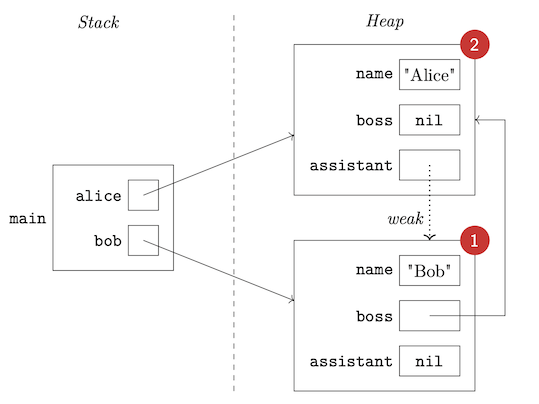
When main exits:
- The variable
alicewill go away, decrementing the reference count on the heap object representing Alice to 1. Heap storage cannot yet be reclaimed. - The variable
bobwill go away, decrementing the reference count on the heap object representing Bob to 0. This means heap storage can be reclaimed, and thus all of this object’s properties can go away. - One of the properties of this object is itself a reference, so its referent’s reference count will be decremented...to 0. Heap storage for Alice can now be reclaimed.
Ownership and Borrowing
Another way to avoid a tracing garbage collector but still have a safe, managed, system, is to have the system keep track of who (that is, which variable) owns a piece of memory. When the owner goes out of scope, the memory is freed. Having a single owner means data can not be shared, so there needs to be a mechanism for borrowing.
You’ll find some details in the notes on Rust.
Languages and Memory Safety
There are memory safe and memory unsafe languages. C and C++ are unsafe. So to gain safety, you need to move to a safe language, or...maybe try to enhance C and C++ somehow, perhaps with language supersets or fancy compilers. Here is a video with three ideas:
Performance Issues
Knowing what we know about memory allocation, the stack and the heap, etc., what are some things that affect performance? Some of these may be addressed by the compiler, some by the runtime system, some by the programmer.
- The overhead of calling functions, since parameters, local variable allocation, static and dynamic link management, and more have to be accounted for. We can address some of these issues by:
- Inlining certain functions
- Pre-allocating frames for leaf functions (functions that never call other functions) in the data area or in the stack frame of its caller. Okay admit it, that is so cool.
- Using tail recursion optimizations
- Keeping the number of parameters small to maximize register usage. (This is related to whatever calling convention happens to be in place. Programmers benefit by knowing the conventions! Calling conventions specify the order of evaluation of arguments (left-to-right, right-to-left, in parallel, unspecified), whether arguments to in the stack or in registers, Which registers are allowed for arguments, which registers are to be saved by the caller and which by the callee, and whether the caller or callee has to clean up the stack.)
- Working with stack data is much, much faster than working with heap data. We can address this by:
- Using stack data whenever possible
- Memory fragmentation can slow down heap allocation. We can address this by:
- Customizing allocation strategies. Some languages actually allow you to choose allocators.
- Periodically running a defragmentation routine, or running it in parallel with the program.
- In theory, systems languages are faster than other languages because there is no garbage collector. But:
- Garbage collection can be very fast, and can be done in parallel with the program. OCaml and Go are known to be blazingly fast and they use garbage collectors.
- Concurrency means that “the stack” is not really one stack. Closures mean “the stack” can not actually act like a stack.
- It’s okay to put frames on the heap if you have to!
- There are advanced techniques for these scenarios, outside the scope of these notes, but you can get a sense of what is possible by reading about spaghetti stacks.
What is inlining?A compiler inlines a call when it replaces the call with the body of the callee (with all argument-parameter bindings resolved, of course). If all calls to a given function are inlined, there is no need to generate separate code for the function. Inlining should be faster in general, since there is no call/return overhead (which is substantial for short functions). But if there are thousands of such calls you can end up with more compiled code.
Oh, and there should be care taken if a compiler is inlining a recursive call. Right?
Why tail recursion mattersThis factorial function:
def factorial(n):
    return 1 if n <= 1 else n * factorial(n-1)
is not great because it piles up a whole bunch of stack frames:
factorial(5)
= 5 * factorial(4)
= 5 * (4 * factorial(3))
= 5 * (4 * (3 * factorial(2)))
= 5 * (4 * (3 * (2 * factorial(1))))
= 5 * (4 * (3 * (2 * 1)))
= 5 * (4 * (3 * 2))
= 5 * (4 * 6)
= 5 * 24
= 120
But if we make it tail recursive like so:
def factorial(n, a=1):
    return a if n <= 1 else factorial(n-1, n*a)
Then the evaluation becomes:
factorial(5)
= factorial(4, 5)
= factorial(3, 20)
= factorial(2, 60)
= factorial(1, 120)
= 120
and we need only one stack frame, reusing it for each call!
Beyond The Stack and The Heap
The stack and heap are so ingrained into modern programming language history that it can be hard to imagine other ways to manage memory. This is why you need to check out the seven articles of Ginger Bill’s Memory Allocation Strategies series.
Continue Learning
There are many directions to go from here.
But first, to get you interested, here’s a short video where Ed first reiterates why this stuff matters, then does a capture the flag exercise in ARM Assembly. You’ll hear ample references to the stack and the heap!
Here are a few more items of interest:
- A blog post on C memory layout
- Note from the CS 225 class at the University of Illinois
- The memory layout page from a large C tutorial
Recall Practice
Here are some questions useful for your spaced repetition learning. Many of the answers are not found on this page. Some will have popped up in lecture. Others will require you to do your own research.
- What percentage of security vulnerabilities are due to poor software design and implementation, as opposed to attacks on network infrastructure? 90%
- What percentage of software vulnerabilities are due to poor memory management? 70%
- Even in a programming language abstracts away all memory addresses, why must we still learn about memory? Give two main reasons. It helps us to understand performance and error messages.
- What are registers used for in a typical machine? Registers are used for arithmetic and logic operations.
- To a running process, how is memory viewed? Memory is viewed as a linear array of bytes.
- What are the indexes of the memory array called? Addresses
- What is perhaps the most interesting thing about C compared to most mainstream languages regarding the memory layout of variables? C allows you to get the address of a variable.
- What are the reference and dereference operators in C? The reference operator is
&and the dereference operator is*. - When laying out variables in memory, what hardware requirement prevents all variables from being packed into successive addresses in memory? Alignment
- In which languages are arrays, structs, and tuples laid out in memory together with simpler values like numbers and booleans? In which are they allocated in a separate region of memory and accessed by reference? In C, C++, and Rust, arrays, structs, and tuples are laid out in memory together with simpler values. In Java, JavaScript, Python, and Swift, they are allocated in a separate region of memory and accessed by reference.
- What is the difference between a reference and a pointer? A pointer is a reference whose address is visible to the programmer as an integer and can be operated on via arithmetic operators to get new addresses.
- What is the “value” of a pointer? The address of the referent.
- Why are null references (and null pointers) annoying, in terms of how they must be implemented? There must be a un-referenceable address, or all pointers must allocate additional storage to indication whether the pointer is null.
- Does Python have null references? If not, what is
None?Python does not have null references.Noneis an actual object. - What kind of variable-length data (data whose size is not known at compile time) can be allocated “inline”? Arrays whose size is given by a parameter
- What are three kinds of variable length data that must be stored by reference? Slices, resizable arrays, and linked structures
- What are resizable arrays called in Java? In C++? ArrayLists. Vectors.
- What are some advantages of linked structures as opposed to resizable arrays? Insertions and deletions may be faster; we can allow for circular structures.
- What are the advantages and disadvantages of implicit referencing and dereferencing? The advantage is that the code have fewer explicit operations which can affect readability. The disadvantage is that it is harder to see what is going on.
- What are the four main memory regions? Text, data, stack, heap
- What is the difference between a stack and a heap? The stack is for local variables and the heap is for dynamically allocated memory.
- What are the units that are stored on the stack (the things representing a function invocation occurrence)? Stack frames (which you can also call activation records).
- What kinds of things are stored in a stack frame? Arguments, local variables, return address, dynamic link, temporary variables, callee-save registers, spilled registers, static link or display
- What is a static link and what is its purpose? A static link is a pointer to the most recent frame of the enclosing function. It is used to access non-local variables.
- What is a stack trace? A list of the stack frames that take you to the current point of execution.
- When are stack traces frequently displayed despite not being requested? When an uncaught error occurs.
- What is a stack overflow and what situations may cause it to occur? A stack overflow is when the stack runs out of memory. It can occur when the call chain is too deep, and will occur for sure when there is runaway recursion.
- What is the heap? The heap is the place for values that have to be allocated at run-time, and are not part of a stack frame.
- Why is the heap slower than the stack? Each heap allocation or deallocation is a system call, while stack allocation is just a few register additions and subtractions. The heap can and will almost always suffer from fragmentation.
- What are four bad things that can happen with manual memory management? Memory leaks, dangling pointers, wild pointers, double frees
- What is a memory leak? Memory no longer needed that the programmer “forgets” to free.
- What is a dangling pointer? An active pointer to freed memory.
- What is a wild pointer? A pointer that has never been initialized.
- What is a double free? Memory that is deallocated twice.
- What is another word for a memory-safe language? Managed language
- What does it take for a language to be called memory-safe? It must prevent pointers to stack-allocated data and prevent explicit freeing of memory.
- What are four mechanisms that can be used to prevent dangling pointers? Disallow explicit reference, reference-only-heap-allocated-data, static-level-checking-for-stack-referents, escape-to-heap
- What are three mechanisms for automatic deallocation? Garbage collection, automatic reference counting (ARC), ownership and borrowing
- What mainstream language uses ARC as its default heap management strategy? Swift
- What language brought ownership and borrowing to the mainstream? Rust
- What is it called in C if an entity outlives all bindings to it? What happens in Java, Go, or Python when an entity outlives all bindings to it? A memory leak. In Java, Go, and Python, the garbage collector will eventually clean up the memory.
- What is it called in C if a binding outlives its bound entity? A dangling pointer
- How does Python prevent a binding from outliving the entity it is bound to? How does Rust prevent this from occurring? Python does not allow references to stack-allocated objects to be stored in variables at all. Rust uses ownership and borrowing.
- Even though Java and JavaScript don’t have explicit pointers, knowledge about references is crucial, why?
- How do C++, Rust, and Swift deal with their lack of tracing garbage collection?
Summary
We’ve covered:
- Modern machine architecture
- Memory layout
- The stack and the heap
- Memory safety
- Performance issues