Statics and Dynamics
Language
A programming language is a language for expressing computation.
A computation is a determination of new information from existing information by formal, logical, mathematical, mechanical means, carried out by a sequence of steps, each of which takes a finite amount of time and resources. The expression of a particular computation in a programming language is called a program.
CodeYou can call a program, or a collection of programs making up a system, the “code.” But please don’t call a program “the codes.”
Information is that which informs. In the computational sciences, we represent information as a sequence of characters taken from some finite alphabet. In practice, the Unicode alphabet is most useful alphabet. Sequences of characters can represent almost anything. Here are some examples:
91332.3e-81
⚠️ Stay BEHIND the yellow line! ⚠️
<ul><li>你好</li><li>ᎣᏏᏲ</li><li>ᐊᐃᓐᖓᐃ</li></ul>
/Pecs/Los Angeles/Berlin/Madrid//1 2/3 0/2 2/2 0/3 2///
(* (+ 88 3) (- 9 57))
int average(int x, int y) {return (x + y) / 2;}
{"type": "dog", "id": "30025", "name": "Lisichka", "age": 13}
∀α β. α⊥β ⇔ (α•β = 0)
1. f3 e5 2. g4 ♛h4++
Humans do not think or communicate at the level of characters, but instead chunk characters into values, such as numbers, symbols, tuples, records, strings, sets, dictionaries, and so on, which carry meaning. We classify values into types based on their behaviors. To express computations on values, we construct programs from entities that refer to, store, and manipulate values. How programs are constructed from entities define a language’s statics; how the entities behave and interact defines its dynamics.
Values
Values are the meaningful units of information. Some values are atomic (meaning they cannot be decomposed); these include numbers, symbols, and characters. Nonatomic (decomposable) values include tuples, sequences, strings, records, sets, dictionaries, and references.
Numbers
Numbers describe quantity, order, and measure. The simplest kinds of numbers are one-dimensional (scalar), such as integers and reals. These are generally represented with numerals. Here are some examples taken from various programming languages:
21, 1_000_000, 3838021212885321800888128, 0x17F, 0b101111111, 0o577, 223u8, 32767i16, 0x7FFF_0000u32, 3i32, 55u32, 3i64, 3.14159, 3.14159f32, 88.3f64, 60.2e22, 1.602176634e-19, 3E+11, 9355E-22, 16#5FDE3.A33#e+80, 13#A339#.
Multidimensional numbers, like ratios, complex numbers, quaternions, and octonions, are generally defined with tuples or records, which we’ll cover later.
Symbols
Symbols, also known as atoms, are indivisible things assigned a meaning by their creator. Most programming languages have the atoms true and false (they might be called True and False or T and F) to represent truth and falsity. Other common atoms are null, None, and nil (for the absence of information), and undefined (for the absence of knowledge—unknown, don’t care, or none-of-your-business). In many languages, you can create your own atoms, for example: left, right, up, down, red, green, blue, ready, sent, received.
Some languages require atoms to be prefixed with a colon, e.g., :sent. Sometimes you need an apostrophe as a prefix, e.g., 'sent. There are so many variations.
Characters
A character is a unit of textual information. A character has a name. Examples:
- PLUS SIGN
- CYRILLIC SMALL LETTER TSE
- CHEROKEE LETTER TLO
- BLACK CHESS KNIGHT
- PITCHFORK
- MUSICAL SYMBOL FERMATA BELOW
A grapheme is a minimally distinctive unit of writing in some writing system. It is what a person usually thinks of as a character. However, it may take more than one character to make up a grapheme. For example, the grapheme:
is made up of two characters (1) LATIN CAPITAL LETTER R and (2) COMBINING RING ABOVE. The grapheme:
is made up of two characters (1) TAMIL LETTER NA and (2) TAMIL VOWEL SIGN I. This grapheme:
is made up of two characters (1) BICYCLIST and (2) EMOJI MODIFIER FITZPATRICK TYPE-5. This grapheme:
is made up of four characters (1) SURFER, (2) EMOJI MODIFIER FITZPATRICK TYPE-1-2, (3) ZERO-WIDTH JOINER, (4) FEMALE SIGN. And this grapheme:
requires two characters: (1) REGIONAL INDICATOR SYMBOL LETTER C and (2) REGIONAL INDICATOR SYMBOL LETTER V. It’s the flag for Cape Verde (CV).
When characters are included into a character set, they are assigned a code point. In Unicode, a few hundred thousand characters have been mapped to code points already, and more get added from time to time. Traditionally, code points are written in hex (but they don’t have to be). Here are some examples:
   25 PERCENT SIGN
   2C COMMA
   54 LATIN CAPITAL LETTER T
   5D RIGHT SQUARE BRACKET
   B0 DEGREE SIGN
   C9 LATIN CAPITAL LETTER E WITH ACUTE
  2AD LATIN LETTER BIDENTAL PERCUSSIVE
  39B GREEK CAPITAL LETTER LAMDA
  446 CYRILLIC SMALL LETTER TSE
  543 ARMENIAN CAPITAL LETTER CHEH
  5E6 HEBREW LETTER TSADI
  635 ARABIC LETTER SAD
  71D SYRIAC LETTER YUDH
  784 THAANA LETTER BAA
  94A DEVANAGARI VOWEL SIGN SHORT O
  9D7 BENGALI AU LENGTH MARK
  BEF TAMIL DIGIT NINE
  D93 SINHALA LETTER AIYANNA
  F0A TIBETAN MARK BKA- SHOG YIG MGO
 11C7 HANGUL JONGSEONG NIEUN-SIOS
 1293 ETHIOPIC SYLLABLE NAA
 13CB CHEROKEE LETTER QUV
 2023 TRIANGULAR BULLET
 20A4 LIRA SIGN
 20B4 HRYVNIA SIGN
 2105 CARE OF
 213A ROTATED CAPITAL Q
 21B7 CLOCKWISE TOP SEMICIRCLE ARROW
 2226 NOT PARALLEL TO
 2234 THEREFORE
 2248 ALMOST EQUAL TO
 265E BLACK CHESS KNIGHT
 30FE KATAKANA VOICED ITERATION MARK
 4A9D HAN CHARACTER LEATHER THONG WOUND AROUND THE HANDLE OF A SWORD
 7734 HAN CHARACTER DAZZLED
 99ED HAN CHARACTER TERRIFY, FRIGHTEN, SCARE, SHOCK
 AAB9 TAI VIET VOWEL UEA
1201F CUNEIFORM SIGN AK TIMES SHITA PLUS GISH
1D111 MUSICAL SYMBOL FERMATA BELOW
1D122 MUSICAL SYMBOL F CLEF
1F08E DOMINO TILE VERTICAL-06-01
1F001 SQUID
1F0CE PLAYING CARD KING OF DIAMONDS
1F382 BIRTHDAY CAKE
1F353 STRAWBERRY
1F4A9 PILE OF POO
When representing character values in a programming language, we are sometimes, but not always, able to use graphemes directly, but we can always use code points. To distinguish character values from symbols, apostrophes are generally required:
'A''\x41''\u0041''\U00000041''\u{41}'
You will definitely prefer to use code points for “invisible characters” such as HAIR SPACE, EM SPACE, EN SPACE, FOUR-PER-EM SPACE, THIN SPACE, NO-BREAK SPACE, ZERO WIDTH SPACE, LEFT-TO-RIGHT MARK, RIGHT-TO-LEFT MARK, WORD JOINER, INVISIBLE TIMES, BACKSPACE, HORIZONTAL TABULATION, END OF LINE, FORM FEED, CARRIAGE RETURN, END OF TRANSMISSION BLOCK, ESCAPE, FILE SEPARATOR, GROUP SEPARATOR, etc. Otherwise people looking at your code will be really confused. Many languages provide alternatives for some characters, the most common are:
\nfor\u{a}(LINE FEED, a.k.a. “newline”)\tfor\u{9}(CHARACTER TABULATION, a.k.a. “tab”)\rfor\u{d}(CARRIAGE RETURN)\0for\u{0}(NULL)\bfor\u{8}(BACKSPACE)\ffor\u{c}(FORM FEED)\vfor\u{b}(LINE TABULATION, a.k.a. “vertical tab”)\afor\u{7}(BELL, a.k.a., “alert”)
Here are more extensive notes on characters, that even venture into how characters are encoded into bits for storage and transmission.
Tuples
A tuple is a value that is a finite, ordered collection of values:
(3, true)(1, 5, 2)(9.3, (8, false, null), (true, 222), dog, 'c')()
Sequences
A sequence, also called a list, is a possibly infinite ordered collection of values. In practice, we usually think of lists as being collections of elements all “of the same type” but this is not strictly necessary. Conventionally, lists are delimited with square brackets while tuples use parentheses. Here are some lists:
[3, 5, 7, 11][(9, 3), (5.5, 8), (3, 0)][true, false, dog, 55.22e7, (2, true), [[(1,1)]]][0..](infinite sequence)[]
Strings
A string is a sequence of characters. Strings are used to represent text. Here are some examples:
"Hello, world! \u{263a}""1\t0\t0\n0\t1\t0\n0\t0\t1\n""∀α β. α⊥β ⇔ (α•β = 0)"""
In some programming languages, characters and strings-of-one-character are indistinguishable. In others, they are completely distinct things which cannot be mixed up at all. This is interesting. It is one of the reasons why learning programming languages is both 😵💫 and 🤗.
Records
Briefly, a record is a tuple whose components are named. Examples:
(name: "Rex", breed: "G-SHEP", colors: ["black", "tan"])(shape: circle, radius: 3, color: green, center: (2, 2))(name: "Jewel Loyd", team: "SEA", games: 38, points: 939)(id: 7, electric: false, launched: (year: 2021, month: 2, day: 3))
Sometimes the delimiters are braces instead of parentheses. Sometimes the separator is an equal sign instead of a colon. There are many variations. Record components go by many names, including fields, slots, attributes, or members. There may be other names. The vocabulary can get pretty rich.
It’s sometimes nice to view records pictorially. Here’s one of the records we saw above:
Interestingly, lists, and even tuples, can be viewed as records, because they are ordered:
To be fair, this is just a theoretical device. In most programming languages, lists and records are quite distinct.
Sets
A set is an unordered collection of unique values. Examples:
{3, 5, 7, 11}{true, false, dog, 55.22e7, (2, true), {{(1,1)}}}{"Courtney Love", "Eric Erlandson", "Kristen Pfaff", "Patty Schemel"}{}
{1, 2}, {2, 1}, and {1, 2, 1} are all the same set.
Dictionaries
A dictionary, also known as a map, is an unordered collection of key-value pairs, designed for looking up the value associated with a given key, in which all of the keys are distinct. Here are some examples:
{CA => "Sacramento", HI => "Honolulu", NM => "Santa Fe"}{north => (0, -1), east => (1,0), south => (0, 1), west => (-1, 0)}{3 => 1, 4 => 2, 5 => 5, 6 => 8, 7 => 11}{"the" => 2088, "a" => 2115, "so" => 1022, "I" => 888}
In practice, dictionary key types are often limited to symbols, numbers, and strings (we used all three above), but some programming languages allow additional kinds of keys, but still usually a restricted set of kinds. Typically, languages require keys to be “hashable”.
Dictionaries look like records, but the intent of a record is to represent a thing, while a dictionary represents a collection of things.
References
Here are two records:
Nice, but wait—do these two kids have the same pet, or two different pets that coincidentally happen to have the same name, breed, weight, and colors? The picture suggests two distinct pets. If the kids share the same pet, we’d want this picture:
This picture illustrates a new kind of value, called a reference. A reference value is pictured as an arrow that refers to another value, called its referent. Here is a referent referring to the string value "Hi!":
In some, but by no means all, languages, you make a reference to a value with &, for instance &"Hi!". Given a reference r, you get its referent with *r. These are by far the most common notations, but as always, beware, as many syntactic variations do exist.
It gets worse, though. Some programming languages make it hard to tell whether you even have a reference or not! Some languages implicitly create references for you and implicitly dereference them (that is, get the referent). It can get really confusing. That’s why you should really learn this stuff at a deep level. It is imperative that you understand how each language you program in handles references. We’ll have much more to say about these things later.
Something wickedHere is something just awful:
It is a reference with no referent. It is called the null reference, known also as The Billion Dollar Mistake, and The Worst Mistake of Computer Science. Avoid this demon 👹 at all costs. It is beyond disgusting. It has caused great pain 😖 and economic loss 💸. It should never, ever, have been allowed to exist 🤮😢.
A billion dollars was the estimate in 2009:
null has to be closer to a trillion dollar mistake at this point
— ThePrimeagen (@ThePrimeagen) June 23, 2023
Statics
Now that we’ve introduced values and hinted at types, let’s talk about programs, and how they are constructed.
Programs are built from structural components called entities. Perhaps the most common entities are literals, variables, expressions, statements, and declarations. Also common are functions, generators, classes, and modules.
Other kinds of entities are types, labels, blocks, fields, methods, constructors, destructors, initializers, operators, subscripts, coroutines, continuations, events, threads, tasks, processes, packages, and macros. There are no doubt many more.
Literals
A literal is an entity that directly describes a value. You’ve seen dozens of literals already on this page. We couldn’t really help it. Trying to describe values without giving some sort of representation is basically impossible. As a refresher, here are some examples:
95,0x5F,0b1011111,0.0095E4true,false'*'"Hello, how are you?":sent,:inprogress(0, true, 98.6)["ready", "set", "go"](latitude: 29.9792, longitude: 31.1344){:CA => "Sacramento", :HI => "Honolulu, :AK => "Juneau"}x => x / 2null,None,nilundefined
x => x / 2 is new. What is it? If you have a sense that this is very different kind of literal, you’re right.
Don’t worry that the notation is inconsistent. Programming languages differ a great deal in the characters they use for their literals. Relax. Get used to it. Learn all the things. Make it your superpower to be comfortable with the variations and stylistic differences. If you don’t like what you see, create your own programming language.
Variables
A variable is a container for a value. It “holds” or “stores” a value.
This is a variable:
This is a variable with a value:
Variables generally have names. Here is a variable with a name:
Here is a variable with a name and a value:
The variable is the box. The variable is NOT the name. The variable is NOT the value.
You can still say “x is 5” but what you really mean is “The variable whose name is x contains the value 5.”
Always remember this.
Always remember this.
Ffs, always remember this!
If a variable is allowed to hold different values at different times, the variable is said to be mutable. If a variable may only hold the first value assigned to it for its entire lifetime, it is said to be immutable.
Declarations
Where do variables come from? Usually they are brought into existence by a declaration. Here are some examples of variable declarations in different languages:
| Language | Declarations |
|---|---|
| JavaScript | const x = 5 // immutable let x = 5 // mutable |
| Swift | let x = 5 // immutable var x = 5 // mutable |
| Kotlin | val x = 5 // immutable var x = 5 // mutable |
| Java | final var x = 5 // immutable var x = 5 // mutable |
| Rust | let x = 5 // immutable let mut x = 5 // mutable |
In some languages, variables don’t have to be declared at all, they just pop into existence when they are first used, though often with some restrictions. Lua even allows this for some kinds of variables but not others.
In many languages, you can declare more than one variable at a time using pattern matching. Here are examples in JavaScript:
let [x, y] = [5, 7]
    // Array pattern on left, array expression on right
    // x is 5 and y is 7

let {from: x, to: y} = {from: 5, to: 7}
    // Object pattern on left, object expression on right
    // x is 5 and y is 7

let {name: name, age: age} = {name: "Alice", age: 33}
    // name is "Alice" and age is 33

let {name, age} = {name: "Alice", age: 33}
    // name is "Alice" and age is 33
    // note the awesome shorthand property syntax

let [a, b, ...rest] = [1, 2, 3, 4, 5]
    // a is 1, b is 2, and rest is [3, 4, 5]

let {first, second, ...others} = {first: 1, second: 2, third: 3, fourth: 4}
    // We used the shorthand property syntax again bc it is great
    // first is 1, second is 2, and others is {third: 3, fourth: 4}

Technically, a declaration creates a binding of a name to an entity. Bindings have spatial scope and temporal extent. Scope (almost always) refers to the textual (spatial) region of the code in which the binding can be used. Extent is the (temporal) duration from the time an entity is bound to a name to the time the binding is deactivated, either by reassignment or reaching the end of a block. The entity itself has a (temporal) lifetime, the during from which the entity comes into existence to the time it is destroyed. Many programming errors and security vulnerabilities occur when the extents and lifetimes are not properly managed.
Expressions
Time to talk about computation. An expression is made up of literals and variables connected with zero or more operators, that when evaluated, produces a new value. Here are some examples in Python, assuming x stores the value 5:
2 + xevaluates to7
The expression2 - xevaluates to-5
The expression2 * xevaluates to10
The expression2 / xevaluates to0.4
The expression2 // xevaluates to0
The expression2 % xevaluates to2
The expression2 ** xevaluates to32
The expression2 < xevaluates totrue
The expression2 > xevaluates tofalse
The expression2 == xevaluates tofalse
In Programming Language Theory, the “evaluates to” relation is frequently written ⇓. Here is a more complex expression evaluation in JavaScript. Assuming s holds the value "car", y holds the value 100, and found holds the value true, then:
7 * s.indexOf('r') + Math.sqrt(y) / 2 <= 0 || !found ⇓ true
Here’s an expression for one root of the famous quadratic formula expressed in several languages:
| Language | Expression |
|---|---|
| Lua | (-b + math.sqrt(b^2 - 4*a*c)) / (2*a) |
| JavaScript | (-b + Math.sqrt(b ** 2 - 4 * a * c)) / (2 * a) |
| Python | (-b + (b ** 2 - 4 * a * c) ** 0.5) / (2 * a) |
| Java | (-b + Math.sqrt(b * b - 4 * a * c)) / (2 * a) |
| Kotlin | (-b + Math.sqrt(b * b - 4 * a * c)) / (2 * a) |
| Rust | (-b + (b * b - 4.0f64 * a * c).sqrt()) / (2.0 * a) |
| Clojure | (/ (+ (- b) (Math/sqrt (- (* b b) (* 4 a c)))) (* 2 a)) |
| Swift | (-b + (b * b - 4 * a * c).squareRoot()) / (2 * a) |
| OCaml | (~-.b +. sqrt (b *. b -. 4. *. a *. c)) /. (2. *. a) |
Some expressions do more than just produce values. Along the way, they may generate effects that change the external computational environment, or context, in which the program runs. A great example is Python’s := operator, which makes an assignment in the middle of an expression! Compare:
while True:
    command = input('> ')
    if current == 'Q':
        break
    execute(command)
while (command := input('> ')) != 'Q':
    execute(command)
There is so much to learn about expressions! Operators have precedence, associativity, arity, and fixity. There are various ways specify an evaluation order among expressions. Some operators can actually short-circuit evaluations. And there is more to side-effecting expressions than the simply Python operator we saw above.
For a deeper study of expressions and expression evaluation, see these notes.
Statements
Statements (also known as commands) are entities executed purely for their effects—they do not produce values. You may encounter:
- The empty statement, which does nothing.
- Assignment statements, which store values in variables.
- Conditional statements, which choose what to do based on the result of some computation. Often introduced with keywords such as
if,unless,switch,case,when, ormatch. - Loop statements, which do things over and over. Often introduced with keywords such as
loop,while,repeat,until, orfor. - Disruptive statements, which disrupt the normal flow of control. Examples include
break,continue,retry,redo,return,yield,resume,throw, orraise. - Expression statements, which evaluate an expression then ignore the result.
- Declaration statements, which elaborate declarations.
In Python, we use = for assignment statements and := for assignments in expressions. In Lua, assignments are statements only. In Java and JavaScript, assignments are always expressions, but you can use them in an expression statement.
Functions
A function represents a computation from (zero or more) inputs to (zero or more) outputs. Here is the way we express the cube function in several languages:
| Language | Function Expression |
|---|---|
| JavaScript | x => x ** 3 |
| Python | lambda x: x ** 3 |
| Ruby | ->(x) { x ** 3 } |
| OCaml | fun x -> x * x * x |
| Haskell | \x -> x ^ 3 |
| Java | (x) -> x * x * x |
| Kotlin | (x: Int) -> x * x * x |
| Scala | (x: Int) => x * x * x |
| Swift | {$0 * $0 * $0} |
| Go | func(x int) int { return x * x * x } |
| Rust | |x: i32| x * x * x |
| Lua | function(x) return x^3 end |
| Erlang | fun(X) -> X * X * X |
| Elixir | &(&1 * &1 * &1) |
| Gleam | fn(x) { x * x * x } |
Functions don’t always have to be so simple as to be written with a body that is just an expression. Usually you can write a function declaration which creates a function with a complex body and binds a name to it, using a simpler notation than that used for function values. Often, but certainly not always, a return statement, if present, produces the result of the function.
function change(amount) {
  if (!Number.isInteger(amount)) {
    throw new TypeError('Amount must be an integer')
  }
  if (amount < 0) {
    throw new RangeError('Amount cannot be negative')
  }
  let [counts, remaining] = [{}, amount]
  for (const denomination of [25, 10, 5, 1]) {
    counts[denomination] = Math.floor(remaining / denomination)
    remaining %= denomination
  }
  return counts
}
def change(amount):
    if not isinstance(amount, int):
        raise TypeError('Amount must be an integer')
    if amount < 0:
        raise ValueError('Amount cannot be negative')
    counts, remaining = {}, amount
    for denomination in (25, 10, 5, 1):
        counts[denomination], remaining = divmod(remaining, denomination)
    return counts

A procedure is a function with no outputs. A consumer is a function with no outputs but at least one input. A supplier is a function with no inputs but at least one output. A predicate is a function that produces a boolean result. The popular function filter accepts a sequence and a predicate, and returns a new sequence containing only the elements for which the predicate is true. Here it is in action in a few languages:
list(filter(lambda x: x % 2 == 0, range(10)))
Array.from({length: 10}, (_, i) => i).filter(x => x % 2 === 0)
IntStream.range(0, 10).filter(x -> x % 2 == 0).toArray()

(0 until 10).filter { it % 2 == 0 }

Array(0..<10).filter { $0 % 2 == 0 }

(0..10).filter(|&x| x % 2 == 0).collect()

filter(0, 10, func(x int) bool { return x % 2 == 0 })

List.filter (fun x -> x mod 2 = 0) (List.init 10 (fun x -> x))

filter even [0..9]

lists:filter(fun(X) -> X rem 2 =:= 0 end, lists:seq(0, 9))

List.filter(fn(x) {x rem 2 == 0}, List.range(0, 10))

When calling or invoking functions, arguments are assigned to parameters. Read that again: argument passing is just assignment. Sometimes, languages will have a special syntax just for passing arguments in a readable fashion. Here’s a Python function definition:
def set_line_attributes(thickness, style, color):
    # ...
The function can be called in many ways, including:
set_line_attributes(3, "dashed", "blue")
set_line_attributes(3, color="blue", style="dashed")
set_line_attributes(thickness=3, style="dashed", color="blue")
set_line_attributes(color="blue", thickness=3, style="dashed")
set_line_attributes(3, style="dashed", color="blue")
# ...
If we simply lay out the arguments in order, they match up positionally, and are called positional arguments. If we mention the parameter name, they are called keyword arguments or kwargs. Generally, positional arguments have to come first. Kwargs can go in any order.
If you think about it, the designer of this function should force callers to use kwargs, since how can you possibly remember the parameter order? In Python, all parameters after a * must be kwargs. Here’s a better version of the function:
def set_line_attributes(*, thickness, style, color):
    # ...
Sometimes using a kwarg is silly, so we want to force callers to use positional args only:
def square_root(x, /):
    # ...
You can have both a slash and star:
def f(a, b, /, c, d, *, e, f):
    # ...
Here a and b must be passed positionally, e and f must be passed via kwargs, and you may pass c and d either way.
In languages that support pattern matching in declarations and assignment, you don’t really need a special syntax. Because argument passing is just assignment, you’ll likely get the pattern matching for free when passing arguments! This is very common in JavaScript.
function setLineAttributes({thickness, style, color}) {
  // ...
}

setLineAttributes({style: "dashed", thickness: 3, color: "blue"})
Here’s something cute:
function push({onTheStack: s, theValue: x}) {
  s.push(x)
}

push({onTheStack: breadcrumbs, theValue: 5})
push({theValue: 8, onTheStack: breadcrumbs})
Read those calls. See what we did there?
An advantage of this approach over Python’s kwargs is that you can use a different name for the parameter inside the function than the name used in the call. Slay.
We’ve barely scratched the surface here. There are a lot of different variations on argument-passing, so many that we have to cover them later in more extensive set of notes, in which we’ll see pattern matching in argument passing, default parameters, variadic functions, argument labels, lazy argument evaluation, and semantic variations in the way arguments are matched to parameters. The number of things to look at is 🤯.
Generators
A generator function is a function designed to produce the successive values of a sequence, one value per call. That is, you can get the values, one at a time, on demand, when and only when you need them. This means you don’t have to get them all at once, which is nice because:
- Getting them all at once might take up too much time and memory
- You might not even want them all
- The sequence might be infinite, and you can’t get them all anyway
Here are a couple generators in Python. The first generates the sequence 1, 2, 3 then stops. The second generates Fibonacci numbers—forever:
# A finite generator
def one_two_three():
    yield 1
    yield 2
    yield 3

# Build the actual generator and get its values with next()
g = one_two_three()
print(next(g))  # 1
print(next(g))  # 2
print(next(g))  # 3

# In Python, if the generator is exhausted, it raises StopIteration
try:
    print(next(g))
except StopIteration:
    print("No more values")

# You can also get all the values at once for a finite generator
print(list(one_two_three()))  # [1, 2, 3]


# Now, an infinite generator
def fibonacci():
    a, b = 0, 1
    while True:
        yield a
        a, b = b, a + b

# Build the actual generator and get its values with next()
f = fibonacci()
print(next(f))  # 0
print(next(f))  # 1
print(next(f))  # 1
print(next(f))  # 2
print(next(f))  # 3

# Another great thing about generators is that you can use them in a for loop
for f in fibonacci():
    if f > 1000000000:
        break
    print(f)
JavaScript generators are similar, but must be introduced with function*:
function* oneTwoThree() {
  yield 1
  yield 2
  yield 3
}

const g = oneTwoThree()
console.log(g.next())  // { value: 1, done: false }
console.log(g.next())  // { value: 2, done: false }
console.log(g.next())  // { value: 3, done: false }
console.log(g.next())  // { value: undefined, done: true }
console.log([...oneTwoThree()])  // [1, 2, 3]

function* fibonacci() {
  let [a, b] = [0, 1]
  while (true) {
    yield a
    ;[a, b] = [b, a + b]
  }
}

const f = fibonacci()
console.log(f.next())  // { value: 0, done: false }
console.log(f.next())  // { value: 1, done: false }
console.log(f.next())  // { value: 1, done: false }
console.log(f.next())  // { value: 2, done: false }
console.log(f.next())  // { value: 3, done: false }

for (const f of fibonacci()) {
  if (f > 1000000000) {
    break
  }
  console.log(f)
}
yield, JavaScript has yield*. Do some research to find out when you might use this construct.
Classes
What’s really interesting about many records is not just the values of their components, but how they behave. We like to bundle up the data and the behavior into objects. A class is an entity that defines the structure and behavior of objects, as well as how to create them. You will sometimes hear that a class defined as a factory for creating objects with the same structure and behavior. Here is an example of a class that creates two-dimensional mutable vectors in Python and JavaScript:
class Vector:
    def __init__(self, i, j):
        self.i = i
        self.j = j

    def __add__(self, v):
        return Vector(self.i + v.i, self.j + v.j)

    def __sub__(self, v):
        return Vector(self.i - v.i, self.j - v.j)

    def dot(self, v):
        return self.i * v.i + self.j * v.j

    def __eq__(self, v):
        return self.i == v.i and self.j == v.j

    @property
    def magnitude(self):
        return (self.i ** 2 + self.j ** 2) ** 0.5

    @property
    def normalized(self):
        m = self.magnitude
        return Vector(self.i / m, self.j / m)

    def __str__(self):
        return f'<{self.i}, {self.j}>'

u = Vector(3, 4)
v = Vector(1, 2)
print(u)
print(v)
print(u + v)
print(u - v)
print(u.dot(v))
print(u.magnitude)
print(u.normalized)
print(u == Vector(3, 4))
print(u == Vector(4, 3))
class Vector {
  constructor(i, j) {
    Object.assign(this, { i, j })
  }
  plus(v) {
    return new Vector(this.i + v.i, this.j + v.j)
  }
  minus(v) {
    return new Vector(this.i - v.i, this.j - v.j)
  }
  dot(v) {
    return this.i * v.i + this.j * v.j
  }
  equals(v) {
    return this.i === v.i && this.j === v.j
  }
  get magnitude() {
    return Math.sqrt(this.i * this.i + this.j * this.j)
  }
  get normalized() {
    const m = this.magnitude
    return new Vector(this.i / m, this.j / m)
  }
  toString() {
    return `<${this.i}, ${this.j}>`
  }
}

const u = new Vector(3, 4)
const v = new Vector(1, 2)
console.log(u.toString())
console.log(v.toString())
console.log(u.plus(v).toString())
console.log(u.minus(v).toString())
console.log(u.dot(v))
console.log(u.magnitude)
console.log(u.normalized.toString())
console.log(u.equals(new Vector(3, 4)))
console.log(u.equals(new Vector(4, 3)))
It’s generally better practice to make immutable objects, as these are more secure. Let’s see how this is done, first in Python. We’ll need to use the @dataclass decorator and freeze the object. Begin the code like so:
from dataclasses import dataclass

@dataclass(frozen=True)
class Vector:
    x: float
    y: float

    # Rest of the class goes here
And in JavaScript, you’ll need to use the Object.freeze method:
class Vector {
  constructor(x, y) {
    this.x = x
    this.y = y
    Object.freeze(this)
  }

  // Rest of the class goes here
}
There’s another layer of security that is often employed when creating classes, namely information hiding. In many languages, we can make the properties of the objects created by classes completely invisible to code outside the class. This is generally done by marking various properties private. Privacy is a specific instance of the much more general topic of access control, which we’ll discuss elsewhere, in our expanded and detailed notes on classes.
Classes are not TypesThere is a huge difference between a class and a type. The class of an object is available to you at runtime, via an operation such as
.getClass()or.constructor, while types are part of the static (pre-execution) context of a language. Details will come later when we cover types in more detail.
Modules
Think of a module as a container for a bunch of related entities. Modules are used not only for encapsulation but for information hiding, too. We’ll learn about importing and exporting. Modules are necessary for humans to understand massive software systems.
You can find some very simple notes on modules here, but you’ll learn much more by studying and using the module systems of many different languages. There are a lot of different approaches out there.
Dynamics
While the statics of a language describes how programs are constructed from entities, it dynamics describes the effects of running programs.
A language’s dynamics is defined by giving computational meaning to its statements, expressions, and other entities. There’s a field of computer science called semantics that studies how to formally define the meaning, but that’s way beyond the scope of these introductory notes. We’ll be happy with a much more informal understanding of expressions and statements for now.
Here’s the key idea that has become useful in computer science research: A running program is made up of one or more lines of execution. Each line of execution is a sequence of statements that are executed one after the other. Sometimes within a line of execution, we’ll jump around a bit, thanks to the if, while, for, break, and return statements, as well as function calls and exceptions. Multiple lines of execution will have to coordinate and communicate with other.
Control Flow
Describes how control moves around within a single line of execution
Concurrency
describes how multiple lines of execution coordinate and communicate with each other
Control Flow
How can actions be carried out within a line of execution? There appear to be five broad categories of flow:
- Sequential
- Conditional
- Iterative
- Nondeterministic
- Disruptive
Sequential Flow
In sequential control flow, statements are executed one after the other, in the order they appear in the source code:

let x = 5          // This happens first, x is now 5
let y = 8 - x      // This happens after x is initialized, y is now 3
let z = x + y      // This happens after x and y are initialized
console.log(z)     // This reliably prints 8
Conditional Flow
Within a line of execution, we may sometimes need to choose the next action to perform based on the evaluation of some boolean expression sometimes called a “test.”
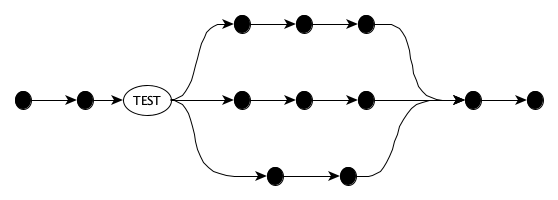
The syntactic variation on this simple conditional flow across many languages is huge. Sometimes the flow is captured at the expression level and sometimes at the statement level. Here’s the simple conditional operator expressed in several languages:
console.log(lat >= 0 ? "North" : "South")
print("North" if lat >= 0 else "South")
System.out.println(lat >= 0 ? "North" : "South")
println(if (lat >= 0) "North" else "South")
println!("{}", if lat >= 0 { "North" } else { "South" })
(println (if (>= lat 0) "North" "South"))

print(lat >= 0 ? "North" : "South")
print_endline(if lat >= 0 then "North" else "South")
In general, multi-way conditions within expressions can be expressed by nesting conditional operators, for instance x < 0 ? "NEG" : x > 0 ? "POS" : "ZERO" but, um, this can get messy. In the case that each alternative is controlled by a single value, many languages have a slick expression form that helps:
var action = switch (color) {
  case Color.RED -> "stop";
  case Color.YELLOW -> "slow down";
  case Color.GREEN -> "go";
}
let action = match color {
    Color::Red => "stop",
    Color::Yellow => "slow down",
    Color::Green => "go"
}
val action = when (color) {
    Color.RED -> "stop"
    Color.YELLOW -> "slow down"
    Color.GREEN -> "go"
}
let action =
  match color with
  | Red -> "stop"
  | Yellow -> "slow down"
  | Green -> "go"
let action = case color of
  Red -> "stop"
  Yellow -> "slow down"
  Green -> "go"
Action = case Color of
  red -> "stop";
  yellow -> "slow down";
  green -> "go"
end.
Conditional flow can also be written at the statement level. Many languages have a simple if statement, for example:
if not started:
    started = True
    yield n
elif n == 1:
    raise StopIteration
elif n % 2 == 0:
    n = n // 2
else:
    n = 3 * n + 1
For multi-way conditional statements, there’s often a nice construct:
match e:
    case 2 | 3 | 5 | 7 | 11:
        print("Small prime")
    case int(n) if n % 5 == 0:
        print("Multiple of 5")
    case (_, x, _):
        print(f"A three-tuple with {x} in the middle")
    case {'id': y}:
        # Matches any dictionary that has an id key, binds value to y
        print(f"Your identifier is {y}")
    case _:
        print("What?")
switch expression and switch statement. We saw Python’s match statement only. Does Python even have a match expression?
Iterative Flow
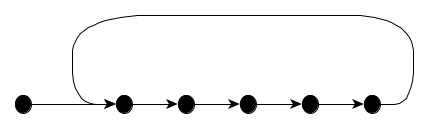
To iterate means to do something repeatedly, allowing for slight differences in the thing at each iteration. An iteration could go on forever:
But typically it employs a test:
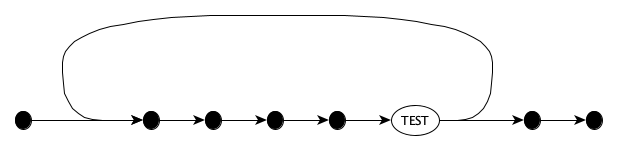
Iteration can be definite (iterating over a fixed collection of things), or indefinite (iterating while or until some condition becomes true).
Indefinite iteration is typically expressed with constructs such as while and repeat.
let level = 5
while (level < 90) {
  level += Math.floor(Math.random() * 9 - 3)
  console.log(`Now at level ${level}`)
}
The classic example of definite iteration is printing each element of a sequence, one per line:
for name in names: print(name)
for (const name of names) console.log(name)
for _, name in ipairs(names) do print(name) end

for (var name : names) System.out.println(name);
for (name in names) println(name)
for name in names { print(name) }
for (const auto &name : names) std::cout << name << std::endl;

for name in names { println!("{}", name) }
for _, name := range names { fmt.Println(name) }
List.iter print_endline names
mapM_ putStrLn names
lists:foreach(fun io:format("~s~n", [Name]) end, Names)
Loop constructs are not the only way to express and carry out iteration. Many languages support iterator objects and comprehension expressions. Some sequence and stream operations (e.g., map, filter, reduce) are also forms of iteration. These are described in separate, more detailed control flow notes.
Another important way to carry out iterative flow is through recursion, that is, carrying out a task with functions that call themselves. We’ll briefly touch on this in our control flow notes, but see it in more detail in the notes on functional programming.
Nondeterministic Flow
Nondeterministic control flow occurs when the next computation step is made randomly (not arbitrarily) from a set of alternatives. It is similar to conditional flow, but there is no explicit test. The runtime system makes a random choice as to how to continue the computation:
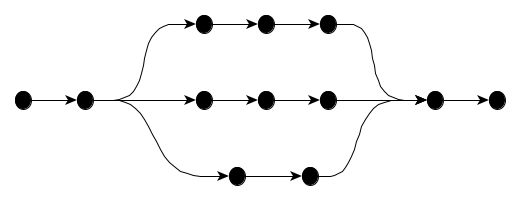
Some languages have a specific construct for nondeterministic choice:
select
    x := 4;
or
    y := 6;
or
    print "Hello";
end;
Sometimes, nondeterminism is more subtle, but it is there, and you have to be aware of it. Suppose that x and y are global variables and the functions f and g can write to them, and consider the expressions f(x) + g(y) and h(f(x), g(y)).
If a language does not require operands or even function arguments to be evaluated in any particular order(e.g., left-to-right or right-to-left) and truly allows the runtime to evaluate the operands in any particular order it wants, then we have nondeterminism.
How does this matter in practice? This says you should learn the evaluation order rules of a language. Or even better, try not to write expressions whose result depends on evaluation order.
Disruption
Conditional, Iterative, and Nondeterministic flow each modify the standard sequential flow but in a structured fashion. That is, every if, while, or select statement is itself just another statement in a sequence of statements. In fact, the very term structured programming refers exactly to this notion.
However, it’s often convenient disrupt the control flow in a very unstructured way.
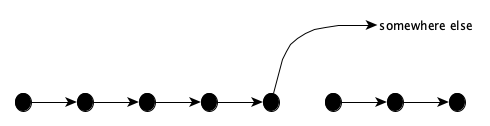
We’ll go straight to examples from real programming languages rather than theoretical examples:
break: Exits the innermost loop.continue: Skips the rest of the current iteration of the innermost loop.redo: Restarts the current iteration of the innermost loop.retry: Starts the whole loop over from the very first iteration.goto: Jumps to a labeled statement.throworraise: Signals an exception, abandoning the current computation and transferring control to the associated handler.return: Exits the current function, possibly returning a value.
See the control flow notes for a deeper dive.
Concurrency
Concurrency is the study of systems with multiple lines of execution. A program with multiple lines of execution is a concurrent program. Concurrent programming is much harder than noncurrent programming since the multiple lines of execution must communication and coordinate.
Can you handle a fire hose of vocabulary up front?
A running program is known as a process. The operating system allocates one or more physicalthreads to a process, with each thread responsible for running a line of execution.
The operating system maps one or more routines onto each thread. A routine is a (possibly parameterized) unit of code. Routines that can only start from the beginning when called are known as subroutines; those that can yield and then are able to resume from where they last left off are known as coroutines. Subroutines are generally called functions. Routines that are properties of, or directly associated with, an object, whose execution reads or manipulates the object’s state, are usually called methods.
The terms “thread” and “process” may also be used for concurrently executing units within a program: threads generally communicate via shared memory, while processes maintain their own local memory and communicate exclusively via messages. A process can send a message directly to a receiver process by naming the receiver, or it may send the message through a channel where a receiver can pick it up. Unlike coroutines which interleave their execution to form a single sequence of instructions and explicitly yield control to each other, threads and processes run independently and may be preempted by the operating system when their number exceeds the number of available hardware execution units.
A particularly simple kind of concurrent execution occurs with an asynchronous routine. In this case, the caller simply launches the async routine and the caller and callee then run concurrently. Usually the callee, upon launch, gives the caller a promise (sometimes called a future object) which the callee will (hopefully) at some point fill in to inform the caller of success or failure. Here some notes on async programming in JavaScript.
TMI without examples? Don’t panic! You might just be taking a course in programming languages or concurrent and distributed programming. If this later, we’re going to move next to these notes. If the former, we’ll get to those notes in a month or two. But for right now, here’s a helpful snapshot of the world of concurrency and its paradigms:
| Paradigm | Description |
|---|---|
| Shared Memory | The multiple lines of execution share memory and resources. Synchronization mechanisms are required to maintain safety. |
| Distribution | The multiple lines of execution each have their own protected local memory and resources, sharing nothing. The lines communicating solely via messages. |
| Coroutines | Multiple lines of execution explicitly yield to and resume each other. They all run on the same physical thread. |
| Async | One line kicks off another line without waiting for the other to finish. |
| Parallel | Multiple lines physically execute near-identical pieces of the same broken-down task, almost always on special parallelized hardware. |
Roughly speaking, concurrent programming is when the lines of execution are quite different, e.g., cooks, waiters, customers, and managers; while parallel programming occurs when a big program like summing an array is broken down into multiple identical-ish tasks like summing a portion of the array.
Concurrency is a massive topic. In fact, there’s a separate page of notes just introducing the topic.
Recall Practice
Here are some questions useful for your spaced repetition learning. Many of the answers are not found on this page. Some will have popped up in lecture. Others will require you to do your own research.
- What is a programming language? A language for expressing computation.
- What do we mean by computation? A determination of new information from existing information by formal, logical, mathematical, mechanical means, carried out by a sequence of steps, each of which takes a finite amount of time and resources.
- Information can be represented as sequences of ________________ drawn from an ________________. characters, alphabet
- Humans don’t think in terms of characters but rather in terms of ________________. Values.
- What are some kinds of values? Numbers, symbols, characters, tuples, records, sequences, strings, sets, records, dictionaries.
- What do we mean by a language’s statics and its dynamics? Statics is the structure of a program, dynamics is its behavior.
- What is the difference between a number and a numeral? A number is a value, a numeral is a representation of a number.
- Symbols are also known as ________________. atoms.
- A character is a unit of ________________, while a grapheme is a unit of ________________. textual information, writing.
- Character sets assign a unique ________________ to each character. code point.
- What are various ways to write the character LATIN SMALL LETTER C? (Hint: its code point is 99, or 0x63.)
'c','x63','\u0063','\U00000063','\u{63}' - Must tuples be finite? Are they ordered? Yes, yes.
- Must lists be finite? Are they ordered? No, yes.
- A string is a sequence of ________________. characters.
- Records are tuples whose components are ________________. named.
- What are various terms used to describe the components of a record? Fields, attributes, properties, members.
- What is a set? An unordered collection of unique values.
- What is a dictionary? A collection of key-value pairs in which all of the keys are distinct.
- How are records different from dictionaries? Records are used to describe a particular thing by its properties; dictionaries generally describe a single property of many things.
- What do references help us describe? The sharing of values.
- How does one conventionally write a reference to the value 5?
&5 - Some languages unwisely allow references without a referent. What is the technical name given to such a reference, and what pejorative phrase does its creator describe it with? A null reference, the billion-dollar mistake.
- What is an entity? A language construct from which programs are constructed.
- What is a literal? An entity that directly describes a value.
- What is a variable? An entity that is a container for a value.
- What do people sometimes confuse variables with? The name of the variable, or the value contained within the variable.
- A variable whose value can be replaced with another value is said to be ________________. mutable.
- What kind of entity brings variables into existence? A declaration.
- What mechanism is used to declare multiple variables in a single construct? Pattern matching.
- What is an expression? An entity made up of variables, literals, and operators that describes a computation and produces a value when evaluated.
- What is a statement? An entity that describes an action to be carried out, but that does not produce a value.
- What is a function? An entity that describes a computation from zero or more inputs to zero or more outputs.
- What happens when a function is called? Arguments are assigned to parameters, and the function’s body is executed.
- What are the two kinds of arguments in Python? Positional arguments and keyword arguments.
- How do you simulate kwargs in JavaScript? By passing an object in the call.
- How does a generator differ from a typical function? A generator produces a sequence of values, one at a time, each time it is called.
- What is a class? An entity that defines the structure and behavior of a family of objects and how to create them.
- How do you make an object immutable in JavaScript? By using
Object.freezeto freeze the object upon construction. - What is a module? A container for a bunch of related entities, usually with import and export controls.
- What are some different kinds of control flow within a line of execution? Sequential, conditional, iterative, nondeterministic, and disruptive.
- What is sequential control flow? Statements are executed one after the other.
- What is conditional control flow? The next action is chosen based on some condition.
- What are different ways of expressing iterative flow? Loops, each-functions, iterator objects, comprehensions, and recursion.
- What names to we give to the looping mechanisms that (a) check for a termination condition and (b) iterate through a fixed collection or range? (a) Indefinite, (b) definite.
- In many mainstream languages, indefinite loops use the ________________ keyword, and definite loops use the ________________ keyword. while, for
- What is the major difference in communication between a thread and process? Threads communicate via shared memory, processes communicate via messages.
- In message passage communication, the sender can either name the receiver or write to a ________________. channel.
- When calling an async function the callee immediately returns a ________________ to the caller before executing. promise.
- Another word for a promise is a ________________. future.
Summary
We’ve covered:
- Terminology surrounding information and computation
- Values
- Statics
- Entities
- Dynamics
- Five categories of control Flow
- Definition of concurrency
- Some terms in the study of concurrency